
Quick Start
This guide covers integrating the erupt-tenant multi-tenancy module into an erupt project. For a feature overview, see Erupt SaaS Multi-tenant.
TIP
erupt-tenant is a commercial module. After purchase, contact the author to get access to the source repository.
Source Code
- Frontend: https://gitee.com/erupt/erupt-web
- Backend: https://github.com/erupt-io/erupt-tenant
Module Structure
erupt-tenant consists of two Maven modules:
| Module | Description | Depends On |
|---|---|---|
| erupt-tenant-core | Multi-tenancy core: the @EruptTenant annotation, data-isolation DataProxy, tenant context EruptTenantContext, inheritable tenant base classes | erupt-jpa |
| erupt-tenant | Full tenant management: tenant config / tenant menus / tenant packages, tenant-side users / roles / organizations, tenant login API | erupt-upms + erupt-tenant-core |
1. Build the Source and Publish to Local Repository
INFO
Supported in 1.12.16 and above
Clone the erupt-tenant source from GitHub: https://github.com/erupt-io/erupt-tenant
Switch to the tag matching your version: https://github.com/erupt-io/erupt-tenant/tags
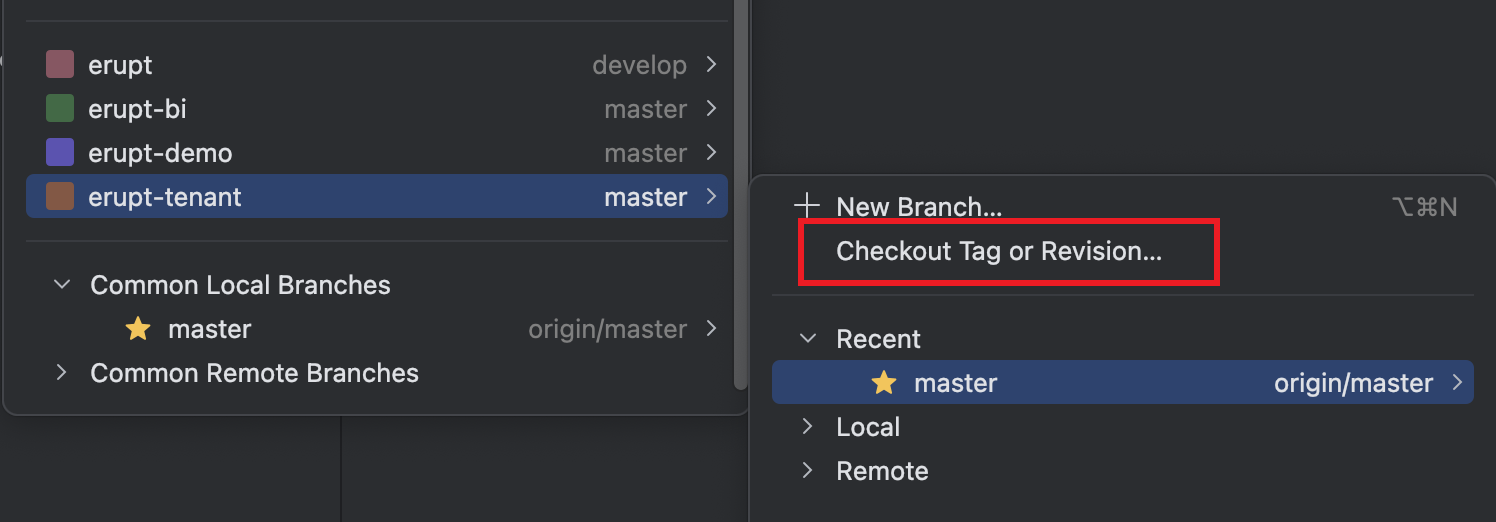
Run the following maven command in the project root to publish to your local repository or private registry:
mvn -D skipTests=true install2. Add the POM Dependency
WARNING
You must complete the previous step (publishing to your local repository) before the dependencies below become available.
erupt-tenant: the multi-tenant permission control module. Add this dependency alongside erupt-admin to enable multi-tenancy directly:
<dependencies>
  <dependency>
    <groupId>xyz.erupt</groupId>
    <artifactId>erupt-tenant</artifactId>
    <version>${erupt.version}</version>
  </dependency>
</dependencies>erupt-tenant-core: the multi-tenant core module providing base multi-tenancy features. For erupt-cloud-node scenarios, this dependency alone is sufficient.
3. Start the Application
On startup, the module initializes all menus automatically — no SQL scripts required:
- Super-admin side: registers a "Tenant Management" root menu containing Tenant Config, Tenant Menu, and Tenant Package
- Tenant side: initializes a "System Management" menu containing Org Management, Role Management, and User Management, and auto-generates button-level permission menus based on each erupt class's
powerconfiguration
After creating a tenant in Tenant Config (enterprise ID, tenant name, admin account/password, assigned package), tenants can sign in via the tenant login page:
http://your-host/#/passport/tenantOnline demo: https://demo.erupt.xyz/#/passport/tenant
Next, read Multi-tenant Development to enable tenant data isolation for your business tables.
Contributors
 YuePeng
 Claude Fable 5.1