
Erupt Cloud Server
Distributed node management center. Replaces traditional configuration center yml files with database tables; manages node configurations, service registration, and request scheduling through a visual interface.
Core Capabilities
Traditional microservice configuration centers (Nacos, Apollo, etc.) rely on yml/properties files for configuration management, and changes require re-publishing or restarting services. Erupt Cloud stores configurations in database tables, enabling visual editing through the admin interface. Nodes pull updates in real time with no additional configuration center infrastructure to maintain.
| Traditional Config Center | Erupt Cloud |
|---|---|
| yml / properties files | Database tables (visual management) |
| Requires deploying Nacos / Apollo | Reuses the existing database |
| Nodes must be notified to refresh after changes | Nodes pull actively; changes take effect immediately |
| Configurations scattered across project repositories | Centrally maintained on the Server side |
Usage
1. Create an Erupt Project
Refer to Quick Start
2. Add Maven Dependency
<dependency>
  <groupId>xyz.erupt</groupId>
  <artifactId>erupt-cloud-server</artifactId>
  <version>${erupt.version}</version>
</dependency>
3. Add Redis Configuration and Enable redis-session
spring:
  data:
    redis:
      database: 0
      timeout: 10000
      host: 127.0.0.1
      port: 6379
      password:
erupt:
  redis-session: true
WARNING
Since Spring Boot 3, the Redis configuration prefix is spring.data.redis.*. The legacy spring.redis.* prefix no longer works.
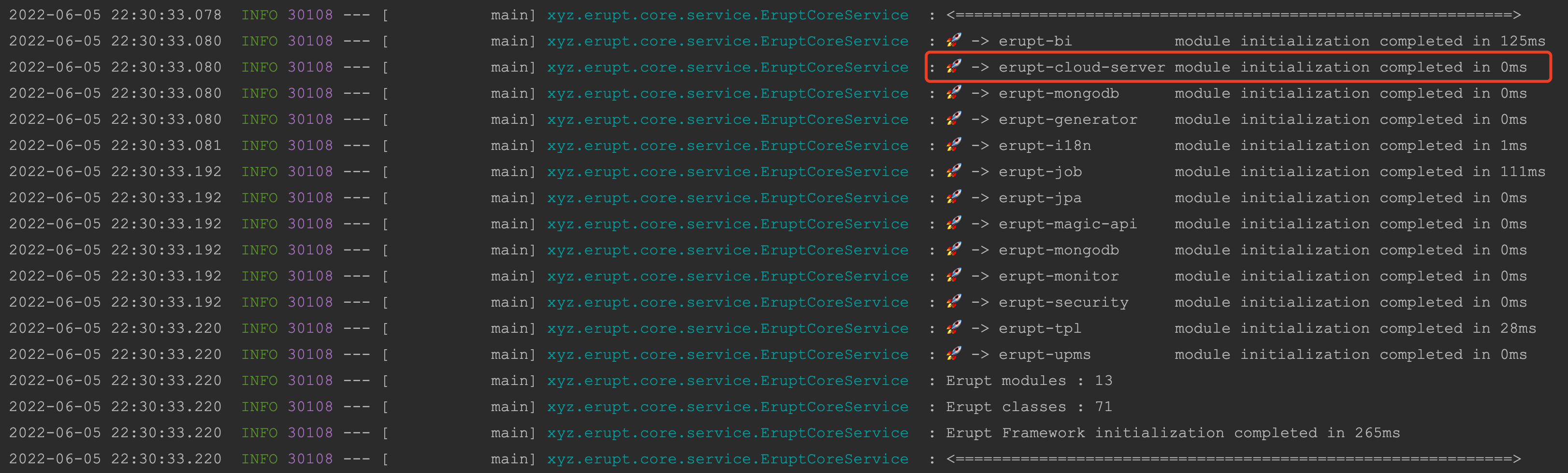
4. Start the Project
After logging in, node management menus appear:
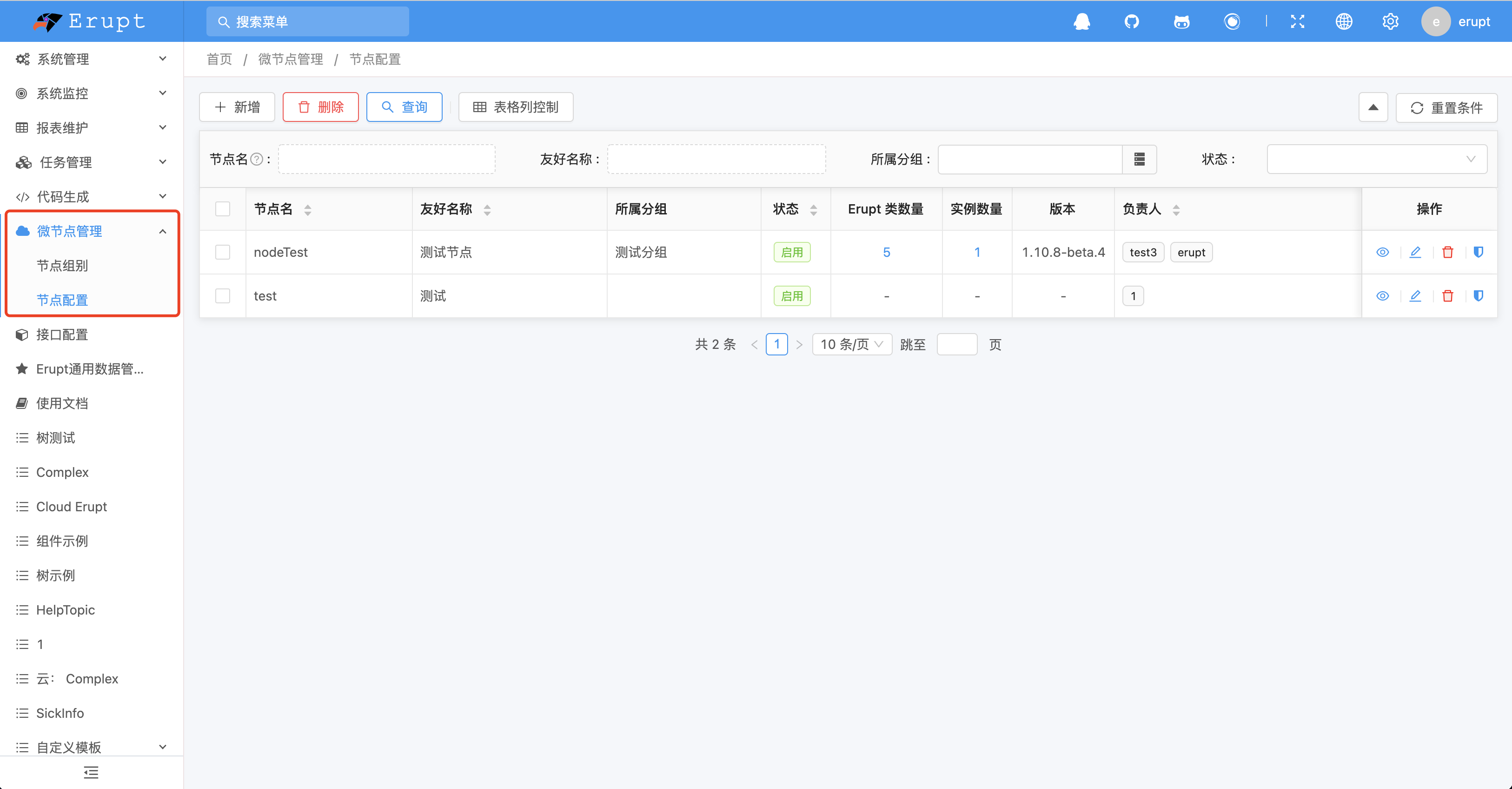
Deployment successful!
Optional Configuration
erupt:
  cloud-server:
    # Cloud key namespace (optional)
    cloud-name-space: 'erupt-cloud:'
    # Node persistence duration, in ms
    node-expire-time: 60000
    # Node liveness check interval, in ms
    node-survive-check-time: 120000
    # Whether to validate node access-token, default true (supported from 1.11.4+)
    validate-access-token: true
    # Also send the plain access-token next to the request signature, default true; turn off once every node verifies signatures (2.4.0+)
    plain-access-token: true
    # Timeout of a request forwarded to a node, in ms
    node-request-timeout: 30000
@EruptRouter(cloudProxy) v2.3.0+
For module authors: by default, a /erupt-api/** request that targets a node model is forwarded by the Server to the Node that owns it. When an API only keys on the erupt name and its logic belongs entirely to the Server — record comments, for example, where the node neither carries the module nor knows the server's users — mark it @EruptRouter(cloudProxy = false). Such an API is never forwarded to a node; the Server answers it itself under the nodeName.eruptName it addressed. erupt-comment uses exactly this so that records of node models can carry comments too.
What the Server Does for a Node v2.4.0+
A node only has to implement the protocol's basic endpoints (build, table, get, init-value, add, update, delete); the server does the rest from the node's build model. The build is fetched with the server's own signed GET /erupt-api/build/{erupt} and cached for a minute, once per language: a Java node translates titles and option labels according to the Lang header the request carries, so each language gets its own entry; the other language SDKs do not translate yet, so their entries are identical.
Checks before forwarding
- Power: the right
@EruptRouter(power)declares (add, edit / view details, delete, export, import) is checked against the user's menu permissions before forwarding, refused with the standard "insufficient permissions" error; thepowerof the build sent to the browser is restricted to the user's rights as well. A node therefore does not have to (and cannot forget to) check it - Payload: the query or record
@EruptRouter(payload)declares is validated against the node's build. A query: conditions only on searchable fields with a legal operator, sorts only on sortable columns or the primary key, page size at most 1000. A record: not-null, numbers, text length, choice options, XSS, and every declared limit throughEruptValueValidator, with the messages a local erupt gets - A parent vouches only on its own node: a nested erupt opened from a parent's menu (sub-table, tab, reference) is let through only when the parent lives on the same node, otherwise 404; the nesting relation itself is checked by the node, since only it holds the annotation metadata
Request signing
Every forward carries Erupt-Timestamp and Erupt-Signature: CloudSignature computes an HMAC-SHA256 keyed by the node's access token over the method, path and query, timestamp, Erupt-Enforced, user and body, accepted by the node within 300 seconds. The Erupt-Enforced header (power / query / record) tells the node which checks the server already ran, so it may skip them; it is covered by the signature and trusted by the node only once the signature verifies. Calls the server makes on its own behalf (EruptRemoteRouter: AI / MCP tools, workflow) are signed the same way.
Endpoints the server answers itself
The server answers the following from the node's build, reading and writing data only through the basic endpoints a node already serves, so a node implements none of them:
| Feature | How |
|---|---|
| Reference labels | A node's rows carry only the referenced key; the server reads each distinct key once from the referenced erupt and fills in the {id, label} object and the flattened field_column columns |
| Reference trees, tree erupts, tab trees, checkboxes | Built from the referenced erupt's table data, nested by the id / label / pid of referenceTreeType / tree; a field with a filter or orderBy is still forwarded to the node |
| Excel template / export / import | When the node answers 404: the template is written from the build, an export pages through table, an import validates each row and adds it through add, stopping at the first failing row and reporting how many went in |
| Attachments, rich-text images | Stored on the server under the field's attachmentType / htmlEditorType; the node only keeps the returned path string. Downloads are served by the server too |
| Static options | A CHOICE / MULTI_CHOICE / TAGS without a fetchHandler is answered from the build's componentValue; one with a handler is forwarded, falling back to componentValue on 404 |
| Cell edit, batch edit | update-cell / update-cells: the whole row is read through get, patched, validated as a record and saved through the node's update, so the node's DataProxy runs as usual |
| Field sub-models | GET /erupt-api/build/{erupt}/{field}: the field's fieldReturnName is read from the build, then that erupt's build is fetched |
| Drag sort | drag-sort: each row of the {id: position} body is one cell edit of the field dragSort.field names |
| Board / calendar / gantt writes | Group, date and dependency changes are likewise read whole, patched and saved whole; a gantt link that would close a cycle is refused |
| Dependent pickers | For a referenceTableType.dependField picker the server adds dependColumn = dependValue to the query |
Node capabilities and the invoke endpoint
A node may declare capabilities when it registers; today the only one is invoke. A node registering invoke (the language SDKs do) serves a single endpoint for a field's own code:
POST /erupt-api/invoke/{erupt}/{kind}/{name}kind is options (options from a fetchHandler), onchange, autocomplete, button, operation (a row operation) or operation-form (the operation form's opening values); the server turns the browser's corresponding calls into this one, and reads the reference picker itself. A node without invoke (a Java node) still receives the original comp/choice-item, data/onchange, comp/button, data/{erupt}/operator/{code} and related endpoints.
Protocol spec and language SDKs
The full wire protocol is in erupt-cloud/PROTOCOL.md; the JSON Schema generated with erupt lives in schema/erupt-annotations.schema.json and schema/erupt-node-defaults.json. The Python, Go, TypeScript, PHP and .NET node SDKs built on them are in erupt-sdk; for a non-Spring node on the JVM see Node Lite.
Docker Deployment
The Server side supports Docker deployment. New features only require developing Node instances:
docker pull erupts/erupt:versionThe image version matches the Erupt version number. Version information: https://hub.docker.com/repository/docker/erupts/erupt/general
Refer to the Changelog for the latest version number.
Contributors
 YuePeng