
Erupt Revision Record History and Recycle Bin
erupt-revision keeps a field-level change history for every record of any @Erupt model: each add, update, cell edit and delete that goes through the erupt data pipeline leaves a numbered revision in the same transaction, saying which field changed, from what, to what. The record panel shows the history and lets an update be rolled back; deleted records wait in a recycle bin and can be restored at any time. The history lives in a table of its own, so no business model needs a new field.
Minimum version: 2.4.0
Setup
<dependency>
  <groupId>xyz.erupt</groupId>
  <artifactId>erupt-revision</artifactId>
  <version>${erupt.version}</version>
</dependency>
erupt-spring-boot-starter-all already includes this module, so projects on starter-all need not add it. The module depends on erupt-upms (which brings erupt-data-jpa along).
Auto configuration announces the module to the frontend through registerProp("erupt-revision"): a History entry appears in the title bar of the record panel, and a Record Revision menu appears under System Management.
What Is Recorded
The module listens to the three core events EruptAddEvent / EruptEditEvent / EruptDeleteEvent, so every change that goes through the erupt data pipeline is captured: form adds and updates, cell edits, deletes, batch adds from an import, and whatever other modules publish these events (a bar dragged in a gantt view, for instance). The listeners run inside the caller's transaction, so a change and its revision commit or roll back together; a failure to write the history is only logged as a warning and never takes the change itself down.
One row per change, with version counting up from 1 per record:
| Field | Description |
|---|---|
| Model / Record ID | Model name and the primary key as a string, so any key type fits |
| Version | Which change of this record it is |
| Operation | ADD, UPDATE or DELETE |
| Operator | Snapshot of the operator's name, still readable after the user is removed |
| Changes | JSON array [{field, title, before, after}]; title is the form title at the time of the change |
How before / after are taken:
- Only
@EruptFieldfields are compared, field by field; anADDlists every non-empty field (nobefore), aDELETEevery field (noafter), anUPDATEonly the fields that actually changed - Values come from the record's masked JSON, so a
PASSWORDfield never lands in the table - Reference fields (REFERENCE_TABLE, REFERENCE_TREE, CHECKBOX, TRANSFER, TAB_TREE, TAB_TABLE_REFER) are stored as
{pk, label}only and compared by key: a renamed referenced row is not a change of this record. Owned sub-rows (TAB_TABLE_ADD, MULTI_FORM, COMBINE) keep their full JSON, since a rollback has to rebuild them - An empty string, array or object equals
null, so resaving a record unchanged leaves no trace
TIP
The module's own EruptRecordRevision and classes not registered as an erupt are never captured, so history never records history.
Database table
The module has a single table, e_record_revision, extending HyperModelCreatorOnlyVo (which brings id, create_by, create_time) with an index on (erupt, record_id):
| Column | Type | Description |
|---|---|---|
tenant_id | VARCHAR(64) | Owning tenant, '0' for the platform; stamped from the writer's session, so a tenant reads back only the history it wrote |
erupt | VARCHAR(100) | Model name |
record_id | VARCHAR(100) | The record's primary key as a string |
version | INT | Version number within the record |
operation | VARCHAR(64) | ADD / UPDATE / DELETE |
operator | VARCHAR(100) | Snapshot of the operator's name |
changes | large text | The field-level diff as JSON |
Projects with JPA schema generation enabled get the table on upgrade; projects that maintain their schema by hand should create it from the table above.
History Drawer and Rollback
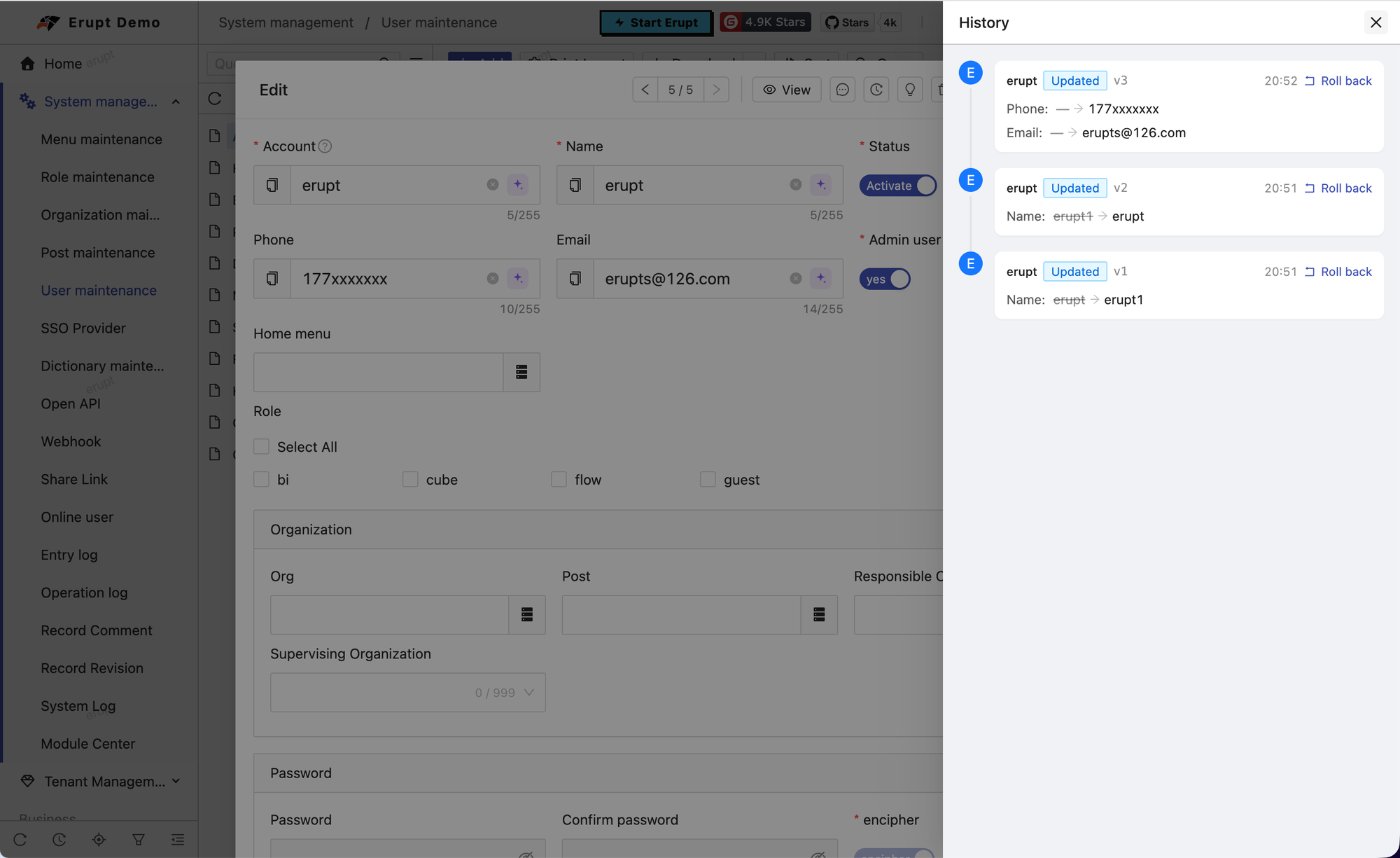
Open a record's panel from the table (edit or detail, either works) and click the history icon in the title bar: a drawer on the right shows the record's timeline, newest first. Each entry carries the operator's avatar and name, an operation tag, the v version number and the time, followed by one line per changed field:
UPDATE:before → after, with an empty side shown as—ADD: only the value writtenDELETE: only the value at the time of deletion
References are shown by their label, lists are joined with commas, booleans read as yes / no. Whoever may open the model may read its history; the permission is the model's own menu permission.
Rollback
When the model grants edit power, every UPDATE entry carries a Roll back link that, after confirmation, puts the before values of the fields in that revision back onto the record. The rollback goes through the regular update pipeline: validation, DataProxy hooks and the operation log all run, and it writes a fresh UPDATE revision of its own (whose before / after are the reverse of the one rolled back), so a rollback can itself be rolled back.
A few constraints:
- Only the fields in that revision are restored; every other field keeps its current value. Rolling back an old revision undoes that one change, it does not rewind the whole record to that point in time
- Only
UPDATEcan be rolled back: anADDhas no "before", and aDELETEis restored from the recycle bin instead - The record must still exist; a deleted record cannot be rolled back
PASSWORDfields and fields removed from the model since are skipped
The table re-queries after a successful rollback.
Recycle Bin and Restore
System Management → Record Revision is the administrative view of the whole history. Filter Operation on Delete and it is the recycle bin: every record deleted through erupt is there:
| Column | Description |
|---|---|
| Model | The filter lists only models that actually carry revisions, labelled by display name; a model removed since still shows its name |
| Record ID | Primary key of the changed record |
| Record | A summary of the record: the first 3 text fields the table shows (40 characters each) joined with ·, taken from before the change for a delete, so a row reads like the record rather than an id; a delete that was restored since is marked (Restored) |
| Version / Operation / Operator | As above |
| Changes | The field-level diff as JSON, in a code view |
The menu allows neither add nor edit (history is written by the pipeline only), but does allow delete and export.
Restore
The Restore row button is enabled on DELETE rows only (ifExpr = "item.operation === 'DELETE'"). It rebuilds the record from the before side of the delete snapshot through the regular add pipeline: validation, DataProxy hooks and permissions all apply, and the restore is itself a new ADD revision.
- Needs add power on the target model
- The record's latest revision must be a
DELETE(otherwise "The record is not in the recycle bin"), and the record must not currently exist (otherwise "The record already exists") - A model whose key is
@GeneratedValuecannot reuse the old key: the record comes back under a new id, the whole history of the old id moves under the new one, and theADDis numbered on from the delete revision; a model with a custom key is restored under its original id
WARNING
What cannot come back with the record: PASSWORD fields (never stored, so they come back empty) and a reference to a row that was deleted too (restore that one first).
DANGER
Deleting a row in the bin is the table's ordinary delete: on a DELETE revision it drops the only copy of the deleted record, which then leaves the bin for good; on any other row it merely prunes history.
Opting a Model Out
@Power gains a revision attribute, true by default. Opt out explicitly for models that do not need a history, such as a high-volume log table:
@Erupt(
    name = "Login Log",
    power = @Power(revision = false)
)
public class LoginLog extends BaseModel {

}
The server then stops capturing changes of that model and the frontend hides the history entry. See @Power.
API
All endpoints live under /erupt-api/revision; the second path segment is the model name and authorisation matches opening that model's table (@EruptRouter(authIndex = 1, verifyType = ERUPT, cloudProxy = false)):
| Endpoint | Description |
|---|---|
GET /erupt-api/revision/{erupt}/{id} | The full history of one record, newest version first; each item is { id, version, operation, createTime, userId, userName, userAvatar, changes } |
POST /erupt-api/revision/{erupt}/{id}/{revisionId}/rollback | Roll back one UPDATE revision; needs edit power on the model |
POST /erupt-api/revision/{erupt}/{id}/restore | Restore a record from the recycle bin; needs add power on the model and answers the restored primary key, which may be new |
before / after inside changes are returned as stored: a reference is {pk, label}, and the absent side is null.
Contributors
 YuePeng