
Erupt AI Canvas v2.1.0+
INFO
One sentence, one page. Describe what you need in natural language and AI Canvas generates a complete page with live data from your Erupt backend — no frontend coding, no deployment.
Introduction
AI Canvas is an AI page-generation module built on top of erupt-ai: pick a data model in the designer, describe the page you want, and the LLM outputs a complete HTML page (rendered live with Vue 3 + Element Plus). The page reads real data through the Erupt REST API via a built-in SDK, the result is stored in the database, and it can be published to the admin menu with one click.
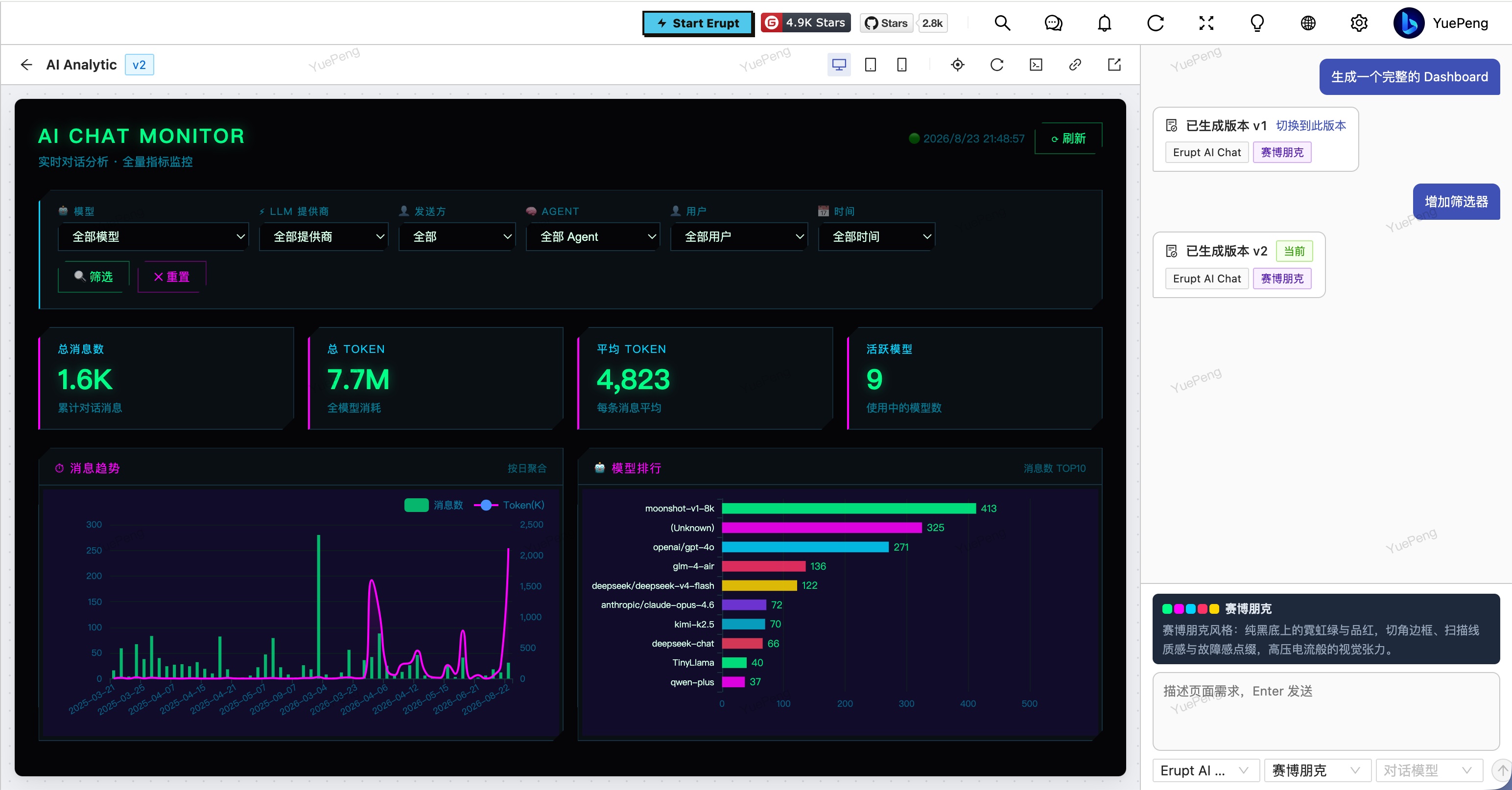
Key capabilities:
- Streaming generation: the generation process streams token by token over SSE and can be stopped at any time
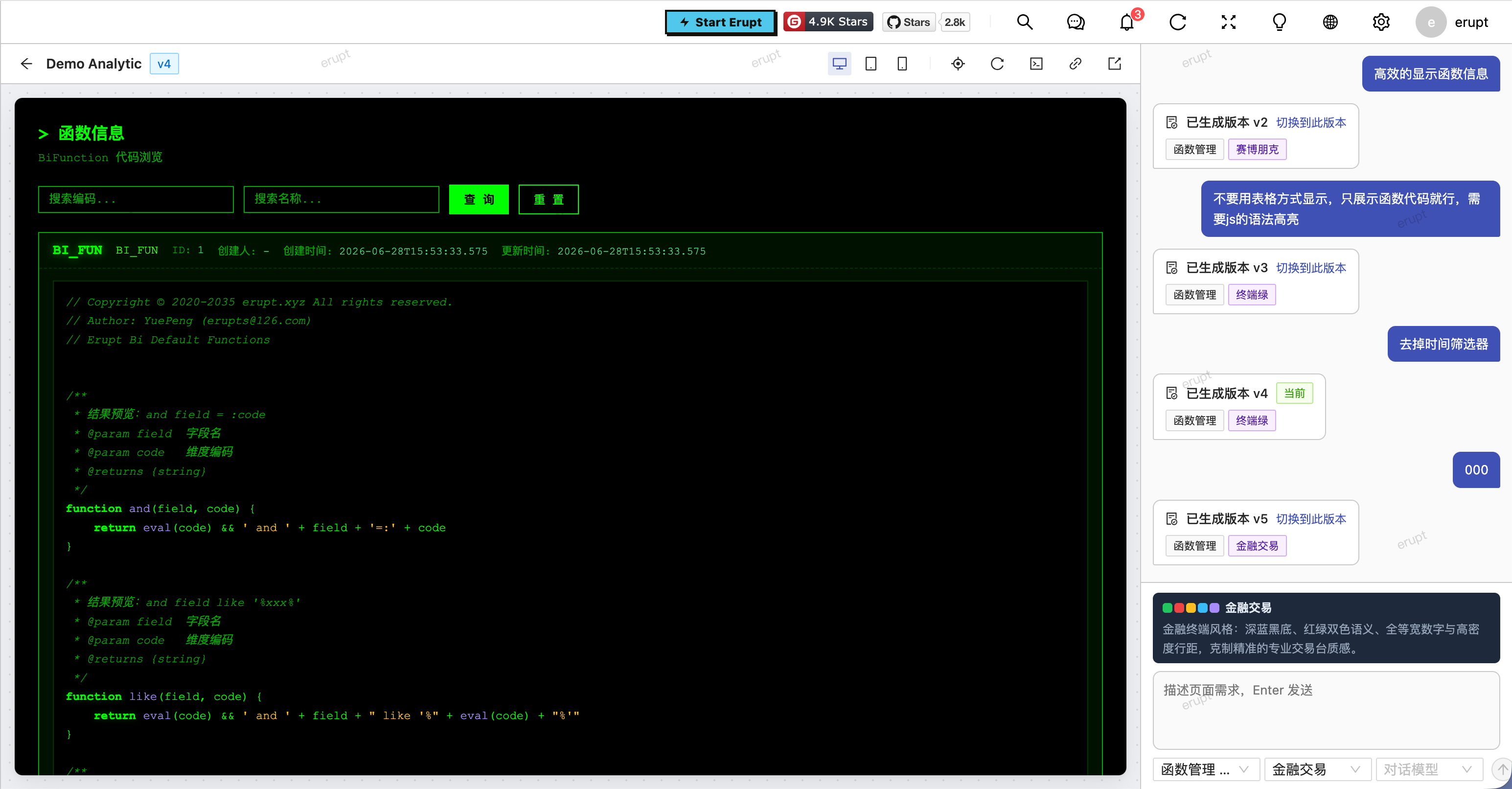
- Version management: every generation round becomes a version; switch to / activate any historical version
- Element picking: hover to select an element on the page and tell the AI exactly what to change (down to the CSS selector path)
- Three device previews: desktop / tablet / mobile viewport switching
- Live data connection: generated pages read real data through the Erupt REST API, rendered in real time with Vue 3
- One-click publish to menu: published pages become admin menu entries governed by Erupt's native permission system
- Selectable chat model: pick the LLM used for generation per canvas, right in the designer
- Query self-verification (ReAct): during generation the AI first executes its planned queries through verification tools; only verified queries make it into the page — no "looks-like-it-works" fake code
Installation
<!-- Supported from version 2.1.0 and above -->
<dependency>
    <groupId>xyz.erupt</groupId>
    <artifactId>erupt-ai-canvas</artifactId>
    <version>${LATEST}</version>
</dependency>
The module depends on erupt-ai (LLM configuration) and erupt-upms (menus and permissions), and bundles the Vue 3 / Element Plus / axios frontend assets. Everything is pulled in transitively — no extra setup required.
WARNING
Before use, configure at least one working LLM in erupt-ai's LLM menu and set a default model. See Erupt AI Quick Start.
Quick Start
- Add the dependency and start the application — an AI Canvas menu appears in the admin console automatically;
- Create a record in the AI Canvas list (just fill in the name;
Codeis auto-generated as a unique 6-character short code); - Click the Designer row operation to open the visual designer;
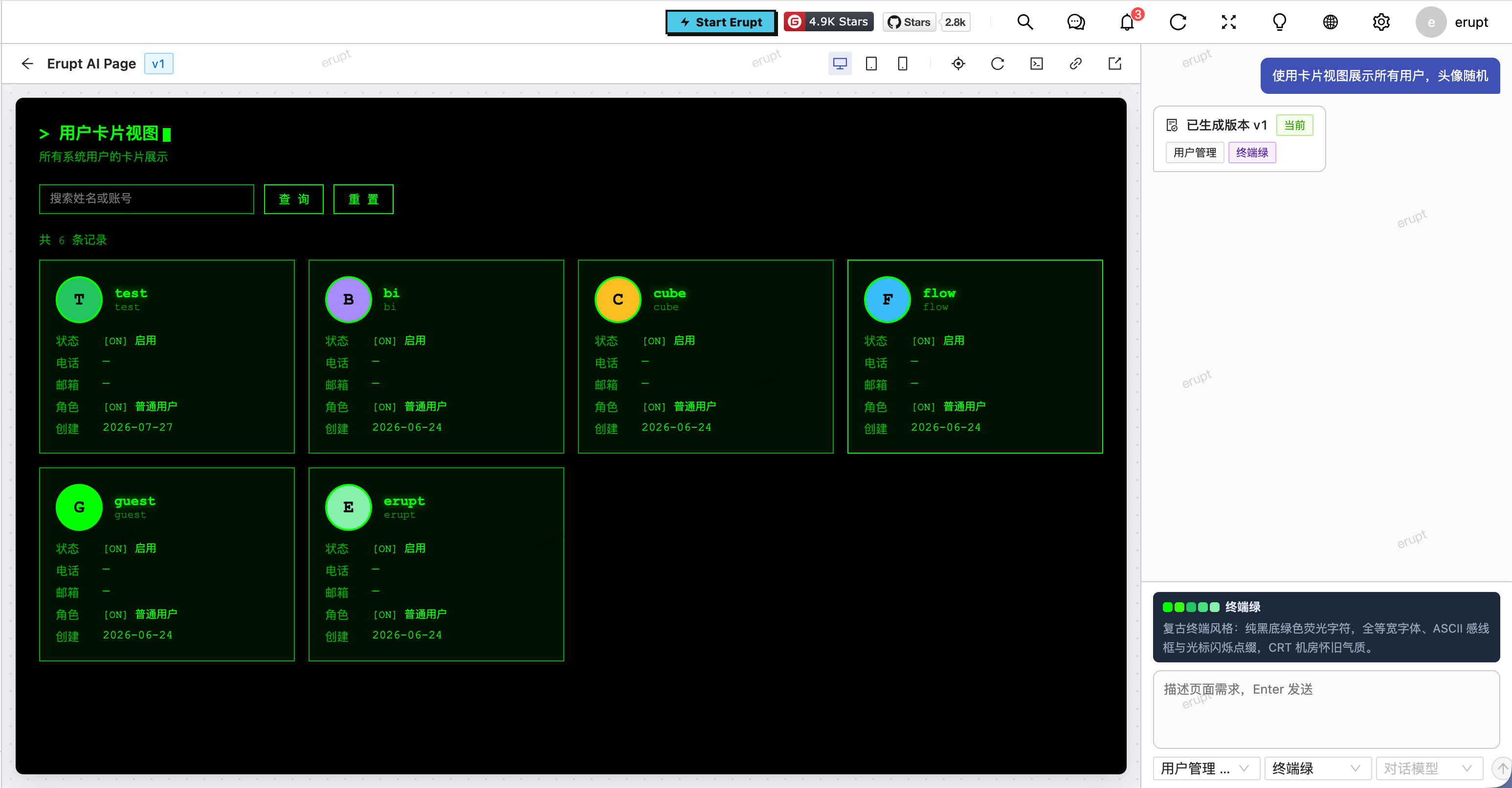
- In the designer, choose the data source type and data model, a page style (optional), and a chat model (optional — defaults to the default model configured in erupt-ai);
- Describe the page in natural language, e.g. "generate a product list page with search by name, sorted by create time descending" — the AI streams the page out with a live preview.
The Path column in the list opens a full-screen preview directly (route: #/fill/ai/canvas/{code}).
TIP
Generated pages call the Erupt data APIs with the visitor's own login token, so data permissions always follow the logged-in user — no privilege escalation.
Core Capabilities
Streaming Generation
The designer streams the generation process token by token over SSE (text/event-stream), including the AI's query-verification actions (tool-call events) and the page code itself. You can stop at any time during generation:
- Explicit stop: the current round is discarded and no version is created;
- Accidental disconnect (page refresh, network hiccup): the result is still persisted as a new version in the background — reopen the designer to see it.
The SSE timeout is controlled by erupt-ai's erupt.ai.sse-timeout setting (default: 15 minutes).
Version Management
Every generation round appends a version record containing that round's requirement message, a snapshot of the data source and style, and the full page source. The designer lists all historical versions, and you can activate any of them — the activated version's HTML becomes the page served to visitors.
INFO
Manual tweaks to the current page HTML are kept until the next generation; each round revises the current page source rather than replaying past requirements.
Element Picking
Hover over and select an element in the preview before describing your change. The AI receives that element's CSS selector path and applies the change precisely to the selected element, leaving the rest of the page untouched — no more "change one thing, break everything".
Device Preview
The designer has built-in desktop / tablet / mobile viewport switching, so you can verify the page's responsive behavior without leaving the designer.
Publish to Menu and Access
Click Send to Menu in the AI Canvas list's row operations, fill in the menu name and parent menu, and the page becomes an admin menu entry of type aiCanvas (whose menu value is the canvas code), governed by Erupt's native menu permissions — only roles granted that menu can access it.
Access path: the frontend route #/ai/canvas/{code} embeds the page in an iframe; the page HTML is served by the endpoint erupt-api/ai-canvas/html/{code} (login required), with the visitor's token and the page SDK injected automatically by the server. Turning off a canvas's Enable switch takes the page offline temporarily without deleting the menu.
Extension Point: CanvasModelProvider
Data sources are extensible via the CanvasModelProvider interface — register an implementation as a Spring bean and it is picked up automatically. The built-in EruptCanvasModelProvider (type erupt) exposes all Erupt models as data sources.
public interface CanvasModelProvider {

    // Data source type code shown in the designer, e.g. 'erupt'
    String type();

    // Selectable models of this source
    List<VLModel> models();

    // Structure description of one model, injected into the generation prompt
    String describe(String model);

    // Teaches the LLM how pages query this source (SDK functions, shapes); Markdown
    String queryGuide();

    // Object with langchain4j @Tool methods the LLM calls during generation to
    // verify its planned queries actually work (ReAct); null disables verification
    default Object verifyTool() {
        return null;
    }
}
The built-in erupt data source gives generated pages a global Erupt SDK object (Erupt.table / Erupt.row / Erupt.tree / Erupt.choice, plus Erupt.add / Erupt.update / Erupt.remove when the requirement explicitly asks for writes), and ships the following verification tools so the AI verifies before it writes:
| Verification Tool | Description |
|---|---|
verifyTableQuery | Actually executes the paged query the page will run, verifying conditions, sorting and field codes |
getModelStructure | Fetches the structure JSON of any Erupt model (used for cross-model references) |
getChoiceOptions | Fetches the option list of a CHOICE / MULTI_CHOICE field |
INFO
The built-in erupt data source returns paged detail rows and has no aggregation capability, so generated pages will not contain summary or chart widgets faked from paged data. For statistics/analytics pages, add erupt-cube: it registers semantic models as a cube data source so pages can run aggregate queries through Erupt.cube; you can also implement a custom CanvasModelProvider backed by any other data source with aggregation support.
Configuration
The module has no configuration properties of its own; generation reuses erupt-ai's settings:
erupt:
  ai:
    # SSE timeout in milliseconds, i.e. the maximum duration of one generation round; default 15 minutes
    sse-timeout: 900000
LLM onboarding and default-model selection are done in erupt-ai's LLM menu. See Erupt AI Deep LLM Integration.
Contributors
 YuePeng
 Claude Fable 5.1