
Erupt Config Runtime Settings
erupt-config moves an application's runtime parameters into the admin: key/value items maintained per Spring profile, layered the way application-{profile}.yml layers over application.yml. The items are injected into the environment as a Spring property source, so @Value("${key}"), Environment#getProperty and @ConfigurationProperties read them exactly like a config file, and a change saved on the page reaches the running beans at once, without a restart.
Minimum version: 2.4.0
Not a data dictionary
The dictionary (EruptDict) answers which values a field may take and feeds dropdowns; this module answers what a parameter is right now and feeds code. A mail server address, a rate limit, a feature flag, a block of announcement HTML belong here, not in the dictionary.
Setup
<dependency>
  <groupId>xyz.erupt</groupId>
  <artifactId>erupt-config</artifactId>
  <version>${erupt.version}</version>
</dependency>
erupt-spring-boot-starter-all already includes this module, so projects on starter-all need not add it. The module depends on erupt-data-jpa and erupt-toolkit and needs no yml of its own: which profiles an instance reads is decided by spring.profiles.active, the same as for the config files.
Auto configuration adds a Config root menu with two pages, Config items and Effective values.
The Config Page
Config → Config items shows the profile tree on the left and every key of the picked profile on the right.
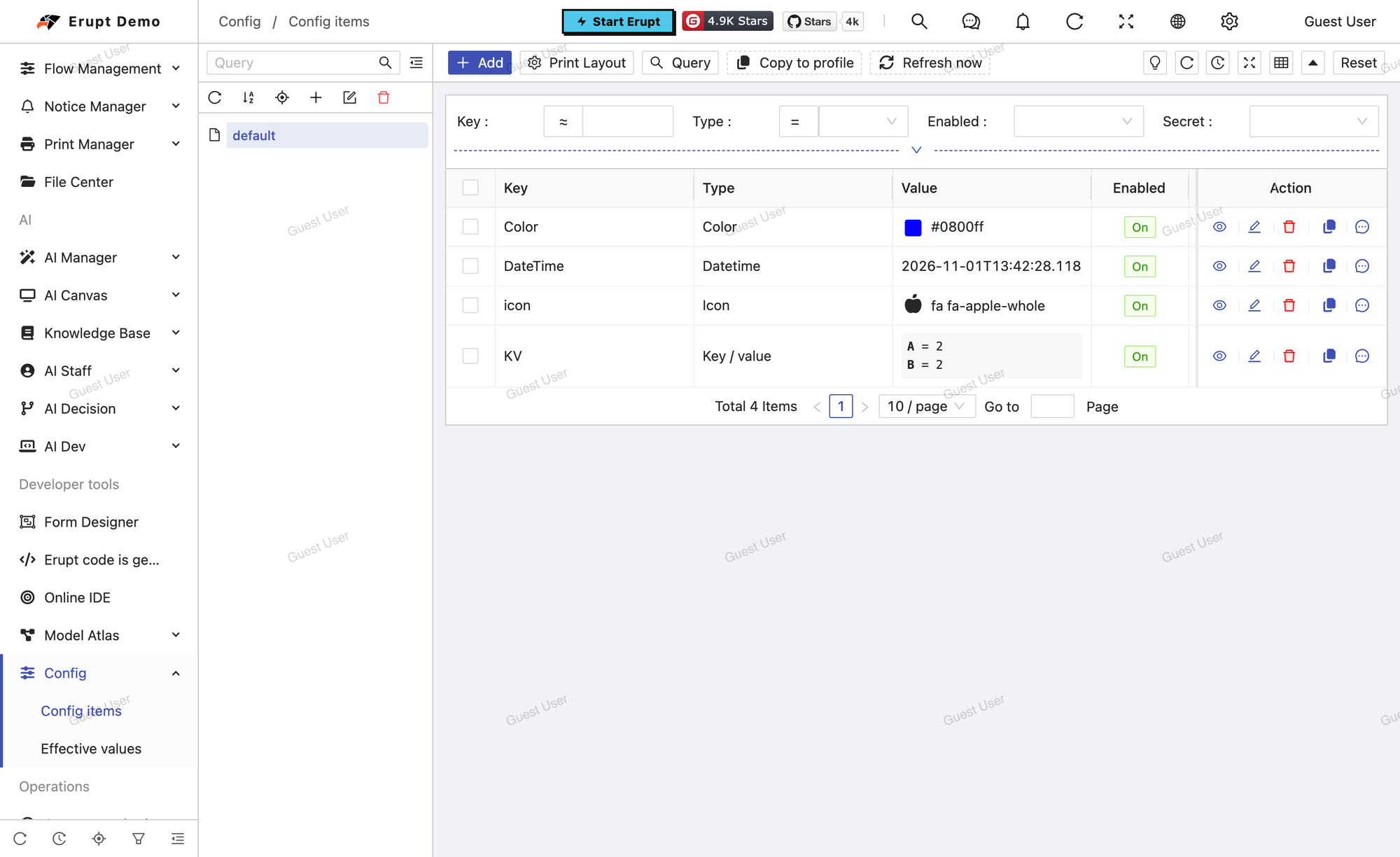
Profile layers
defaultis the base layer every instance reads; the profiles listed inspring.profiles.activelayer on top of it, so a profile only needs the keys that differ fromdefault- On startup an instance creates the profiles it reads (
defaultand the active ones), so the page works on an empty database - Profiles are added, renamed and removed in the tree;
defaultcannot be deleted, nor can a profile that still has items - A profile's code is the Spring profile name (
dev,prod) and matches^[A-Za-z0-9][A-Za-z0-9_.\-]*$
Items
An item added while a profile is picked in the tree belongs to that profile; a key is unique within a profile.
| Field | Description |
|---|---|
| Key | The name @Value reads, such as app.mail.host or feature.beta; matches ^[A-Za-z][A-Za-z0-9._\-\[\]]*$ |
| Type | Picks the editor of the value and how it becomes properties, see Item Types |
| Value | The table draws it by type: a swatch for a color, the icon itself, the picture for an image, a link for an attachment, tags for a list, long text in a box that scrolls |
| Enabled | Switched off, the item stays in the table but the application no longer reads it: the files' value applies again |
| Secret | Shown as •••••• in the table and on the effective values page, and masked in the edit form too; the application still reads the real value. The Password type is always a secret |
| Remark | A note |
Posting the mask back unchanged from a secret's edit form keeps the stored value.
Two operations sit above the table:
- Copy to profile: copies the selected keys into another profile, replacing values already there
- Refresh now: reloads the running values from the database. Saving on the page already refreshes; the button is for a change made straight in the database with SQL or another tool
Effective values
Config → Effective values is a read-only view of the merged result this instance reads right now: one row per property, with the profile it came from (the Source column) and its type. The value is what the Environment answers, so a placeholder referenced inside a value shows resolved. Secrets stay masked here as well. The page carries the same Refresh now button.
Item Types
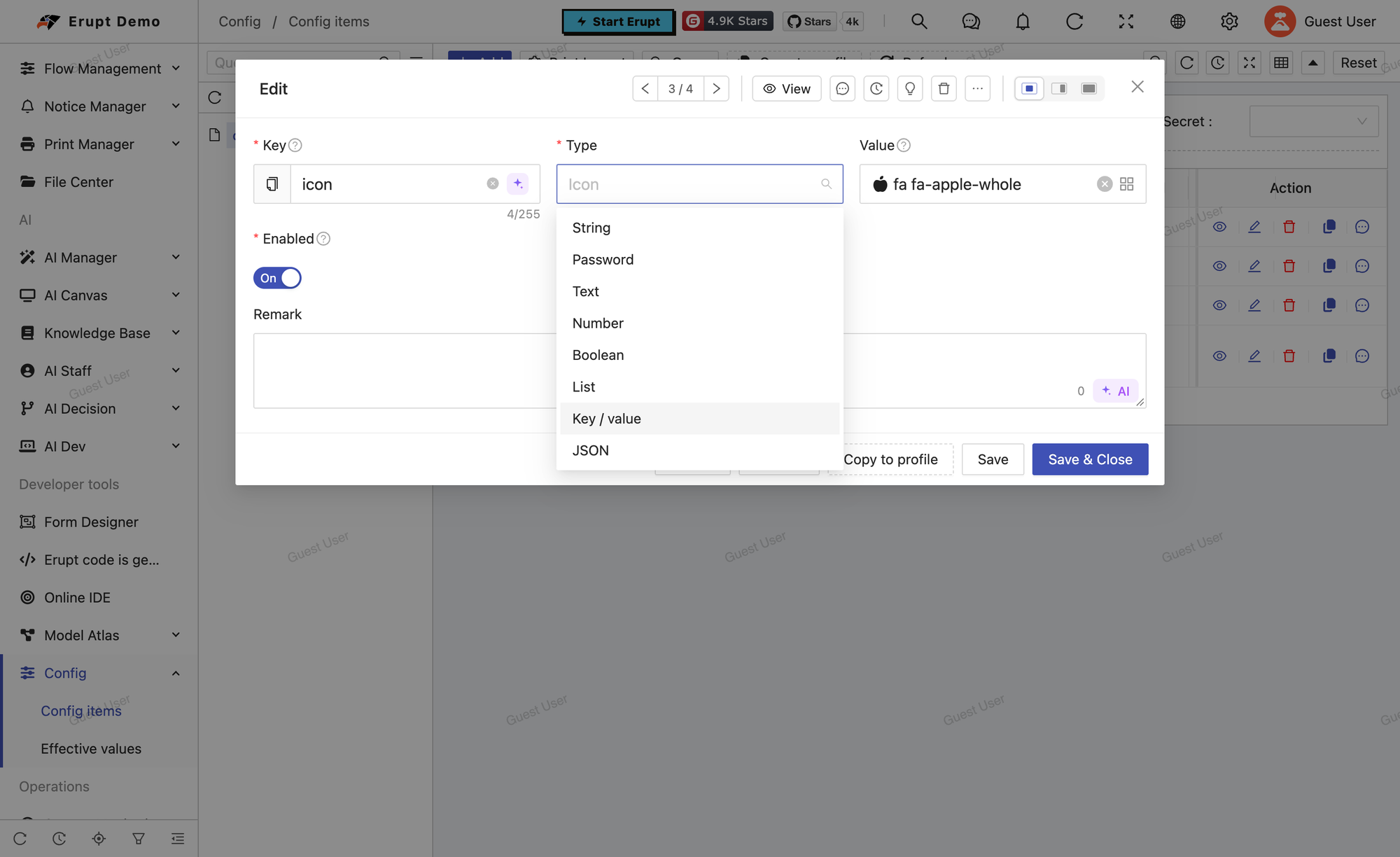
There are 17 types. Apart from the three structured ones, every type yields a single property, key:
| Type | Stored value | Notes |
|---|---|---|
| String | The text | The default type |
| Password | The text | Always a secret: the table and the form show only the mask |
| Text | The text | A text area of up to 4000 characters |
| Number | 8080, 0.5 | A whole number is stored without a decimal part; Spring converts to the target type |
| Boolean | true / false | |
| List | a.com,b.com | Edited as tags, stored comma-separated; binds to a List or an array |
| Key / value | {"team":"data"} | Each entry becomes a key.entry property, so a Map property binds to it |
| JSON | The text | Flattened into key.path and key[i] properties; the raw text is kept under key too |
| YAML | The text | A yml fragment, flattened into key.path properties the way Spring reads a file; the raw text is kept under key too |
| Date | 2026-10-20 | ISO date, binds to a LocalDate |
| Datetime | 2026-10-20T09:30:00 | ISO date-time, binds to a LocalDateTime |
| Time | 09:30:00 | ISO time, binds to a LocalTime |
| Color | #1890ff | A color picker |
| Icon | fa fa-bell | The icon picker; the application reads the class string |
| HTML | The text | A rich text editor |
| Image | /config/banner.png | An uploaded picture; the property is its path under erupt.upload-path |
| Attachment | /config/logo.pdf | An uploaded file; the property is its path under erupt.upload-path |
Key/value, JSON and YAML are validated on save, and malformed text is refused. Take a JSON item with the key demo.rules:
{"maxRetries": 3, "backoff": [1, 2, 4], "nested": {"on": true}}The flattened properties are exactly what a yml file would give, so a @ConfigurationProperties(prefix = "demo.rules") bean binds to them directly:
| Property | Value |
|---|---|
demo.rules | The raw JSON text |
demo.rules.maxRetries | 3 |
demo.rules.backoff[0] … demo.rules.backoff[2] | 1, 2, 4 |
demo.rules.nested.on | true |
Reading Values
How values reach the application
- Before the context starts: once the config files are loaded and the active profiles are known,
EruptConfigEnvironmentPostProcessorreads the layered items with plain JDBC through thespring.datasource.*settings and puts them, as a property source namederupt-config, in front of every file. The very first injection of a@Valuetherefore already sees the database value. On a first boot without the tables yet, or with the database unreachable, the step is skipped with a warning and the application starts on the files' values. - Once the application is ready (
ApplicationReadyEvent): the module creates the profile rows this instance reads and reloads the running values from the database. - At runtime: adding, editing, deleting, enabling or disabling an item, or copying keys into a profile this instance reads, refreshes this instance at once: the property source is replaced, every singleton's
@Value("${...}")field is set again, andEruptConfigRefreshedEventis published with the set of keys that changed. No event is published when nothing changed.
Precedence
Active profile > default > files. With several profiles in spring.profiles.active, a later one overrides an earlier one, matching the order Spring reads application-{profile}.yml in. A key missing from the database falls through to the files as before; a key a profile does not override comes from default.
@Value
@Service
public class MailService {

    @Value("${app.mail.host:localhost}")   // follows a change saved on the page
    private String mailHost;

}
A ${...} placeholder injected into a field is set again on refresh, converted to the field's type; beans behind an AOP proxy are updated on the real target. Two forms are resolved once at startup only and never follow a change:
- SpEL expressions,
#{...} @Valueon constructor or setter injection
Where field injection is not wanted, inject EruptConfig and read on demand instead.
EruptConfig
EruptConfig is a thin wrapper over the Environment; every call reads the current value:
@Resource
private EruptConfig config;

String host = config.get("app.mail.host");
int port = config.get("app.mail.port", Integer.class, 25);
List<String> origins = config.get("app.cors.origins", List.class);
boolean has = config.has("feature.beta");
A key may also be an enum constant whose toString() is the key, which keeps string literals out of the code:
public enum Keys {
    MAIL_HOST("app.mail.host"),
    MAIL_PORT("app.mail.port");

    private final String key;

    Keys(String key) {
        this.key = key;
    }

    @Override
    public String toString() {
        return key;
    }
}

config.get(Keys.MAIL_HOST);
config.get(Keys.MAIL_PORT, Integer.class, 25);
Listening for changes
To act on a change (rebuild a connection pool, clear a cache, reschedule), listen for EruptConfigRefreshedEvent; getKeys() is the set of keys that changed:
@Component
public class MailRefresher {

    @EventListener
    public void on(EruptConfigRefreshedEvent event) {
        if (event.getKeys().stream().anyMatch(key -> key.startsWith("app.mail."))) {
            // reconnect to the mail server
        }
    }

}
Multi-instance Refresh
A change on the page refreshes only the instance that handled the request. The other instances learn of it in one of two ways:
| Way | Condition | Behaviour |
|---|---|---|
| Redis broadcast | erupt.redis-session: true | Once the change's transaction commits, the other instances are told over the Redis channel erupt-config:refresh and reload at once; a rolled back change is never announced |
| Polling | erupt.config.refresh-seconds > 0 | Every n seconds the database is compared (count and latest update time of the enabled items) and values are read only when it differs: a quiet poll is a single count query |
A single instance needs neither. A cluster with Redis sessions broadcasts automatically, with nothing to configure; a cluster without Redis sessions sets refresh-seconds to a suitable interval. The broadcast uses RedisNotifier from erupt-toolkit, the same path erupt-job takes for its cluster notices.
INFO
The Refresh now button on either page broadcasts too: after a change made straight in the database, one click on any instance reloads the whole cluster.
Properties
spring:
  profiles:
    active: prod          # the profiles this instance reads, on top of default; nothing erupt-specific
erupt:
  config:
refresh-seconds: 0 # poll for other instances' changes every n seconds; 0 (default) does not poll| Property | Default | Description |
|---|---|---|
erupt.config.refresh-seconds | 0 | Polling interval in seconds; only a multi-instance deployment without Redis sessions needs it |
erupt.redis-session | false | When on, changes are broadcast to every instance over Redis, see Multi-instance Refresh |
spring.jpa.properties.hibernate.globally_quoted_identifiers | false | Honoured by the JDBC read before startup, so identifiers are quoted the way Hibernate created the tables |
Database tables
The module has two tables, both extending MetaModel (which brings id, create_by, create_time, update_by, update_time):
e_config_profile, unique on code:
| Column | Description |
|---|---|
code | The profile name; default is reserved |
remark | A note |
e_config_item, unique on (profile_id, config_key):
| Column | Description |
|---|---|
profile_id | The owning profile |
config_key | The key |
config_type | Type code: STRING, PASSWORD, TEXT, NUMBER, BOOLEAN, LIST, KEY_VALUE, JSON, YAML, DATE, DATETIME, TIME, COLOR, ICON, HTML, IMAGE, ATTACHMENT |
config_value | The stored value, a large text column |
enabled | Enabled flag |
secret | Secret flag |
remark | A note |
The type column is a string rather than an enum on purpose, so a new type is never blocked by a database check constraint. Projects with JPA schema generation enabled get the tables on upgrade; projects that maintain their schema by hand should create them from the tables above.
Contributors
 YuePeng