
Erupt File Center
erupt-file-center puts a file center inside the admin: the attachment upload directory, any folder on the server, S3 buckets and SFTP directories, browsed in Finder-style columns with an inline preview of images, video, audio, PDF and text. The page uploads (drag-and-drop included), creates folders, renames, deletes, downloads, and copies a file's public link.
Minimum version: 2.4.0
Setup
<dependency>
  <groupId>xyz.erupt</groupId>
  <artifactId>erupt-file-center</artifactId>
  <version>${erupt.version}</version>
</dependency>
erupt-spring-boot-starter-all already includes this module, so projects on starter-all need not add it. The module depends on erupt-upms; its two other dependencies are optional:
- The S3 store needs erupt-data-s3 on the classpath (it brings the AWS S3 SDK)
- The SFTP store needs JSch (
com.github.mwiede:jsch), which erupt-remote already ships; a project without erupt-remote adds it next to this module
Auto configuration registers two menus: File Center (menu type router, value /file-center, which is erupt-web's route of the same name) and a Write button under it. Everything the page does goes through this module's API under /erupt-api/file-center.
Stores
The dropdown at the top left of the page lists every store, in this fixed order:
| Store | Where | Public link |
|---|---|---|
| Uploads | erupt.upload-path, the directory attachment fields write to | /erupt-attachment/... |
erupt.file-center.roots | any folder on the server | none, download through the page |
| S3 · bucket | the bucket attachments go to (erupt.s3), present when erupt-data-s3 is on the classpath and a bucket is configured | the bucket URL or erupt.s3.domain |
erupt.file-center.stores | any number of local folders, buckets or prefixes with their own keys, and SFTP directories | the bucket URL or the store's domain; none for local folders and SFTP |
The first two only take a path; the erupt.s3 bucket reuses erupt-data-s3's configuration, so no keys are repeated here. Every entry under stores has its own type (local / s3 / sftp, default local) and its own connection settings:
erupt:
  file-center:
    roots:                         # extra local folders, keyed by the name the page shows
      Reports: /data/reports
    stores:
      - name: Backups
        type: local
        path: /var/backups
      - name: Media
        type: s3
        bucket: media
        endpoint: https://oss-cn-hangzhou.aliyuncs.com   # MinIO, OSS, COS, R2: any S3 API
        region: cn-hangzhou
        access-key: ${MEDIA_AK}
        secret-key: ${MEDIA_SK}
        path-style: false
        prefix: public             # the store's root inside the bucket
        domain: https://cdn.example.com
      - name: Partner SFTP
        type: sftp
        host: sftp.example.com
        port: 22
        username: exchange
        password: ${SFTP_PASSWORD}
        path: /outbound            # the remote directory that is the store's root
        known-hosts: /etc/ssh/ssh_known_hosts
    text-preview-bytes: 262144
S3 stores
prefix turns one prefix inside a bucket into the store's root; / in keys is read as folders. domain is used for public links; without it the link is built from the bucket URL (path-style keeps the bucket in the path, virtual-hosted puts it in front of the host). A new folder is written as an empty object whose key ends in /; renaming a folder copies and then deletes every object under it, so expect a large folder to take a while.
SFTP stores
type: sftp is rooted at the remote directory path and logs in with a password or a private key: private-key is either PEM text or the path of a key file, with passphrase alongside; when a private key is set only public-key authentication is tried, otherwise the password. With known-hosts pointing at a known_hosts file the server's host key is verified (StrictHostKeyChecking); without it any host key is accepted. The module keeps one SSH session open and reconnects when it drops; every operation runs on a channel of its own, so a large download never blocks someone else's listing.
WARNING
Set known-hosts in production; without it there is no protection against a man-in-the-middle.
Using the Page
Columns Opening a folder shows its contents in a new column to the right, so the columns read as the full path; the breadcrumb at the top jumps back up. ↑ ↓ move within the current column, → enters the selected folder, ← closes the current column and steps back. The search box above the rightmost column filters the current directory only.
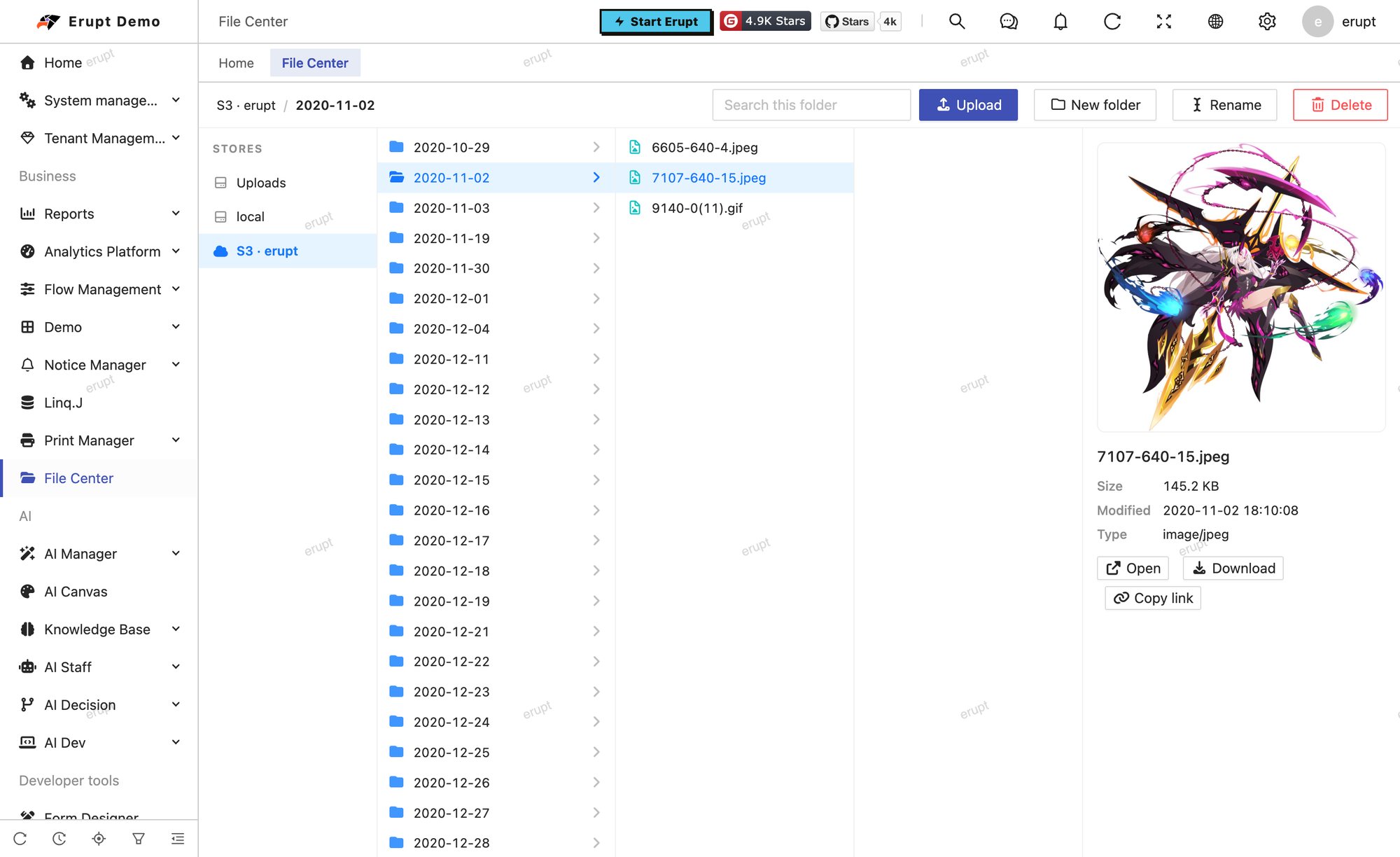
Preview Selecting a file fills the panel on the right according to its type: images, video and audio play inline, PDF is embedded, and text (text/*, JSON / XML / YAML / CSV / SQL, plus common source extensions such as .md .log .properties .java) is shown as content; a text file larger than text-preview-bytes only shows "Too large to preview". The panel also lists size, modified time and type, and its width can be dragged.
| Action | Description |
|---|---|
| Upload | Pick files with the toolbar button, or drop them on a column to upload into that directory; an existing file of the same name is overwritten |
| New folder | Created in the current directory; the name may not contain / |
| Rename | Within the same directory only; the name may not contain / |
| Delete | Multi-select; a folder goes with everything in it, after a confirmation |
| Download | The browser downloads the previewed file |
| Open | Opens the file itself in a new tab |
| Copy link | Copies the file's public URL; only for stores that have one (Uploads and S3) |
Every path is normalized on the server first (\ to /, empty segments and . dropped) and any .. is refused; local stores additionally check that the resolved absolute path still lies inside the root. No request can climb out of a store, and a store's root itself cannot be deleted.
Endpoints
All endpoints live under /erupt-api/file-center and use menu authorisation against the File Center menu (@EruptRouter(verifyType = MENU)). store is the store name and path a store-relative path starting with /:
| Endpoint | Description |
|---|---|
GET /info | What the page needs first: the stores, whether this user may write, and textPreviewBytes |
GET /list?store=&path= | Directory listing, folders first then files, each sorted by name |
GET /stat?store=&path= | One entry with its public link |
GET /raw?store=&path=&download=&_token= | The file itself, for previews and downloads; opened by the browser, so the token travels as _token |
POST /upload?store=&path= | Form field files, uploaded into the given directory |
POST /mkdir?store=&path=&name= | New folder |
POST /rename?store=&path=&name= | Rename |
POST /delete?store= | Body is a list of paths |
Permissions
The file center is one menu plus one Write button under it (value file-center@write):
- A role with the File Center menu may browse, preview and download; every endpoint is authorised against this menu
- Upload, new folder, rename and delete also need the Write button; without it the page is read only, the buttons are disabled, and the server refuses as well ("No write permission")
Write access applies to every store alike. For finer control, a custom store can decide per user and throw.
Properties
| Property | Default | Description |
|---|---|---|
erupt.file-center.roots | none | Extra local folders as a name: path map; the name is what the page shows |
erupt.file-center.stores | none | List of stores, fields below |
erupt.file-center.text-preview-bytes | 262144 (256 KB) | The most of a text file the preview reads; larger files are not previewed |
Fields of each stores entry, by type:
| Field | Type | Description |
|---|---|---|
name | all | Required; the name the page shows and the store parameter of the API; a later duplicate replaces the earlier one |
type | all | local (default) / s3 / sftp |
path | local / sftp | The local folder, or the remote directory that is the SFTP root; required |
host port username | sftp | Host, port (default 22) and user; host and username are required |
password | sftp | Password login |
private-key passphrase | sftp | Key login: PEM text or a key file path, and its passphrase |
known-hosts | sftp | Path of a known_hosts file; the host key is verified only when set |
bucket | s3 | Required |
region | s3 | Default us-east-1 |
endpoint | s3 | Endpoint of a non-AWS service; blank means AWS |
access-key secret-key | s3 | Access keys; blank falls back to the SDK's default credential chain |
path-style | s3 | Path-style addressing, usually true for MinIO and other self-hosted services |
prefix | s3 | Prefix inside the bucket that becomes the store's root |
domain | s3 | Domain used for public links |
TIP
The erupt.s3 attachment bucket already appears as "S3 · bucket" and need not be repeated under stores; stores is for another bucket, another prefix of the same bucket, or a bucket with different keys.
Custom Stores
The store abstraction is the xyz.erupt.filecenter.store.FileStore interface; paths are always store-relative, with / as the root. Any Spring bean implementing it joins the list automatically, after the configured stores:
@Component
public class ArchiveStore implements FileStore {

    @Override
    public String name() {
        return "Archive";
    }

    @Override
    public List<FileEntry> list(String dir) throws IOException {
        // the directory's contents: folders first, then files, each sorted by name
    }

    @Override
    public FileEntry stat(String path) throws IOException {
        // null when nothing is there
    }

    @Override
    public InputStream read(String path) throws IOException { ... }

    @Override
    public void write(String path, InputStream content, long size, String contentType) throws IOException { ... }

    @Override
    public void mkdir(String path) throws IOException { ... }

    @Override
    public void rename(String path, String newName) throws IOException {
        // renames within the same directory
    }

    @Override
    public void delete(String path) throws IOException {
        // a directory goes with everything in it
    }

    @Override
    public String publicUrl(String path) {
        // where a browser can load the file from directly, or null (the default)
        return null;
    }

}
FileEntry is one listing row: name, path (starts with /, no trailing / for a directory), dir, size, modified (epoch millis, nullable) and contentType. The static helpers on the interface are there to reuse: FileStore.normalize(path) normalizes and refuses .., FileStore.join(dir, name) validates a name and appends it, FileStore.parentOf / FileStore.nameOf split a path. A read-only store simply throws an IOException from its write methods; the page shows the message to the user.
Contributors
 YuePeng