
Workflow Development
Forms driven by the erupt workflow engine are erupt classes — workflows and business models share the same annotation system, giving you full control over data. This guide covers data model definition, flow callbacks, and launching flows via API.
Define the Data Model
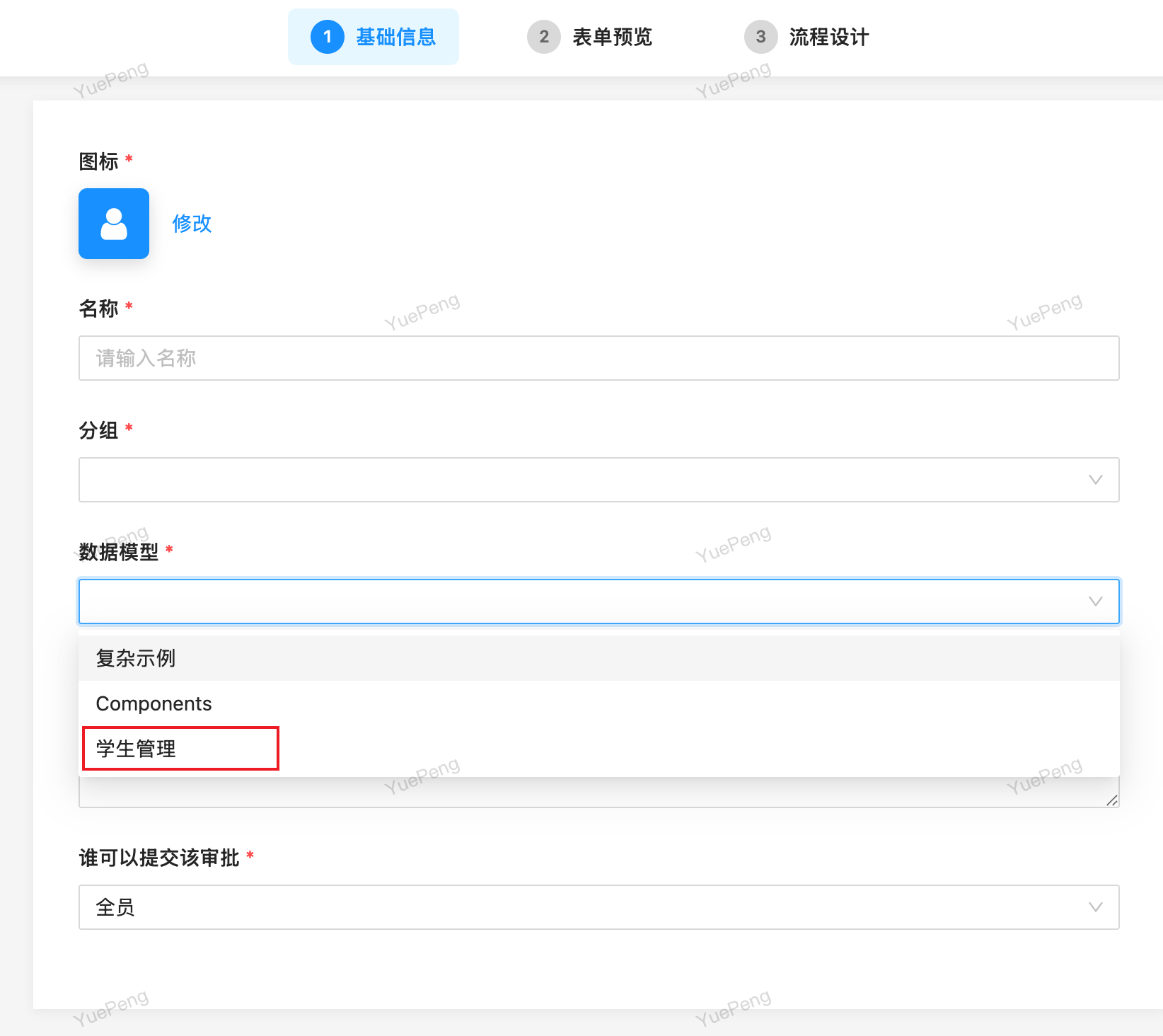
Add the @EruptFlow annotation to any erupt class and it becomes available as a workflow form in the flow designer:
@EruptFlow
@Erupt(name = "Student Management")
@Table(name = "demo_student")
@Entity
@Getter
public class Student extends BaseModel {

    @EruptField(
        views = @View(title = "Name"),
        edit = @Edit(title = "Name", notNull = true)
    )
    private String name;

    @EruptField(
        views = @View(title = "Gender"),
        edit = @Edit(title = "Gender",
                     boolType = @BoolType(trueText = "Male", falseText = "Female"))
    )
    private Boolean sex;

    @EruptField(
        views = @View(title = "Birthday"),
        edit = @Edit(title = "Birthday",
                     dateType = @DateType(pickerMode = DateType.PickerMode.HISTORY)
                    ))
    private Date birthday;

    @EruptField(
        views = @View(title = "Grade"),
        edit = @Edit(title = "Grade", type = EditType.CHOICE, search = @Search,
                     choiceType = @ChoiceType(vl = {
                         @VL(value = "1", label = "Grade 1"),
                         @VL(value = "2", label = "Grade 2"),
                         @VL(value = "3", label = "Grade 3")
                     }, type = ChoiceType.Type.RADIO, trigger = Student.class, triggerParams = {"123"})
                    ))
    private Integer grade;

}
Flow Callbacks (FlowProxy)
Implement flow callbacks when business logic must run on node transitions (e.g., updating business status, sending notifications).
1. Implement the FlowProxy interface — the corresponding methods are invoked as nodes are passed:
@Component
public class FlowProxyImpl implements FlowProxy {

    @Override
    public void onNodeStart(EruptFlowInstance flowInstance, NodeRule nodeRule) {

    }

    @Override
    public void onNodeEnd(EruptFlowInstance flowInstance, NodeRule nodeRule, Flow flow) {

    }

    @Override
    public void onReject(EruptFlowInstance flowInstance, NodeRule nodeRule) {

    }

}
2. Bind it via the @EruptFlow annotation:
@EruptFlow(flowProxy = FlowProxyImpl.class)
@Erupt(name = "Student Management")
@Table(name = "demo_student")
@Entity
@Getter
public class Student extends BaseModel {
}
All three FlowProxy methods are default methods — override only what you need:
| Method | Triggered |
|---|---|
| onNodeStart | When a node starts |
| onNodeEnd | When a node ends |
| onReject | When the flow is rejected |
Launch a Flow via API
Besides launching flows from the UI, you can inject FlowExternalService and call launchFlow in code:
public class FlowTest extends EruptDemoApplicationTests {

    @Resource
    private FlowExternalService flowExternalService;

    @Resource
    private EruptDao eruptDao;

    @Test
    void testLaunchFlow() {
        Student student = new Student();
        student.setName("John");
        student.setSex(true);
        EruptUser eruptUser = eruptDao.lambdaQuery(EruptUser.class)
            .eq(EruptUser::getAccount, "erupt").one();
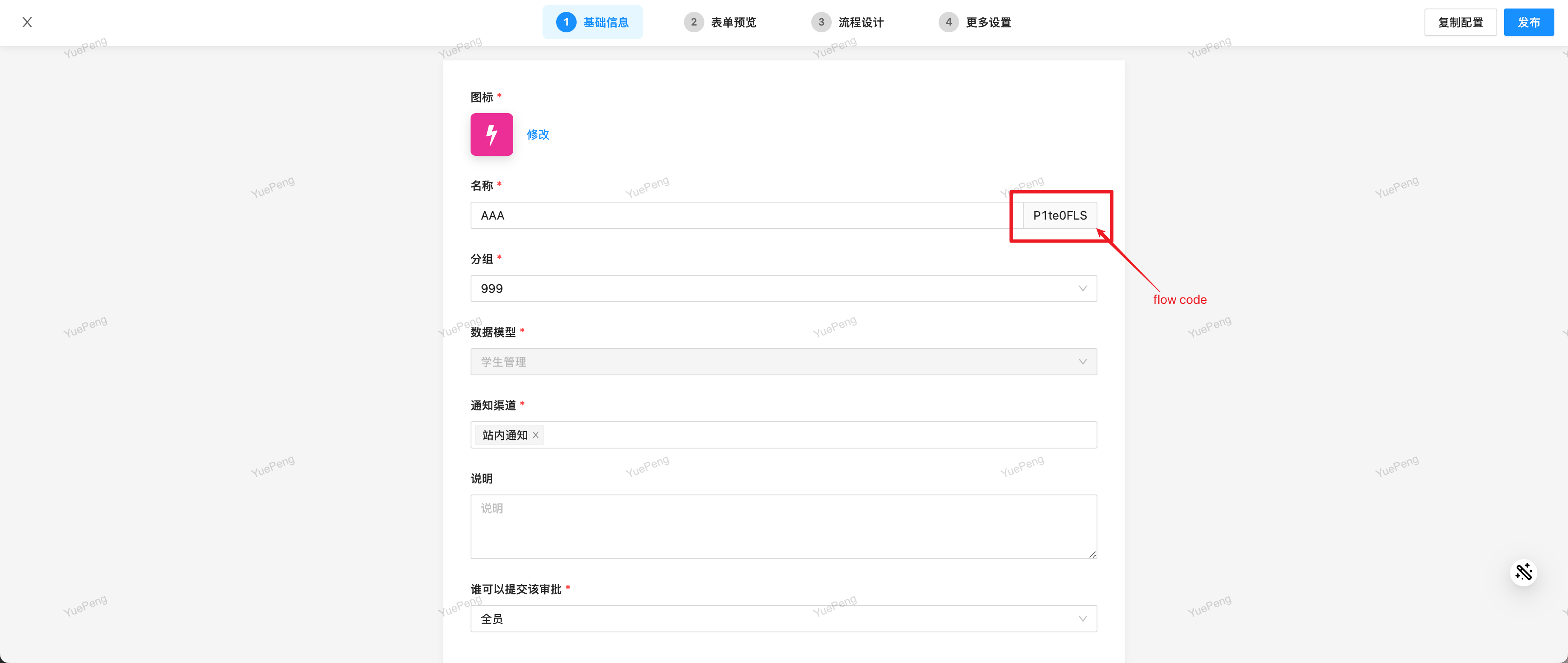
        // Param 1: flow code, visible on the edit page after the flow is created
        // Param 2: flow initiator, obtainable by querying the EruptUser table
        // Param 3: instance of the data model bound to the flow
        flowExternalService.launchFlow("P1te0FLS", eruptUser, student);
    }
}
The flow code is shown on the flow edit page:
Flex Nodes v2.1.0+
Flex nodes are automated action nodes: when the flow reaches one, it executes automatically without human approval — calling HTTP APIs, running scripts, mutating data, computing variables, sending notifications, or waiting for an external callback — giving flows automation capabilities.
Variable Placeholders
Flex node configs support the ${expression} placeholder, where the expression is a JavaScript expression evaluated by a sandboxed Nashorn engine (all Java class access is denied). Three context objects are available:
| Context | Meaning | Example |
|---|---|---|
form | The submitted form data | ${form.amount}, ${form.user.name} |
vars | Variables computed by variable nodes | ${vars.tax} |
flow | The flow instance itself | ${flow.no}, ${flow.status} |
Arithmetic, ternary expressions, and string methods are all supported, e.g. ${form.amount > 1000 ? 'high' : 'low'}, ${form.amount * 2}. Unknown variables or evaluation errors resolve to an empty string.
HTTP Node
Calls an external HTTP API. On a 2xx response, the status code and body are recorded as the node's flow data; a request error or non-2xx status terminates the flow with an error. Connect timeout is 10s, read timeout 30s.
| Config | Description |
|---|---|
| Request Method | GET / POST / PUT / DELETE / PATCH |
| Request URL | Supports placeholders, e.g. https://api.example.com/order/${form.id} |
| Request Headers | One per line, format Key: Value |
| Request Body | Shown for POST / PUT / PATCH only; supports placeholders, e.g. {"orderId": "${form.id}"} |
Script Node
Runs a JavaScript (Nashorn) script. The script can read form (form data) and flow (the instance), and call any Spring bean via bean('name'), for example:
bean('orderService').audit(form.id)The returned value is recorded as the node's flow data; a thrown error terminates the flow.
WARNING
Unlike the sandboxed engine used for ${...} interpolation, the script node's engine is not sandboxed — it runs trusted logic, so only users allowed to edit flow definitions should configure it.
Data Node
Inserts / updates / deletes a row of any registered Erupt model, reusing the Erupt data layer (data proxies, validation, and permissions all apply).
| Config | Description |
|---|---|
| Target Erupt | The target Erupt model |
| Operation Type | INSERT / UPDATE / DELETE |
| Data (JSON) | Supports ${form.x} / ${flow.x}; Insert/Update: field values (Update must include the primary key); Delete: {"ids": ["${form.id}"]} |
Variable Node
Computes named variables and writes them into the vars namespace of the process context, so downstream nodes can reference them via ${vars.<name>} — letting nodes pass computed data to each other.
The config is a JSON object whose keys are variable names and values are JavaScript expressions (over form.x / vars.x / flow.x), evaluated in declaration order — later expressions can reference earlier results:
{
  "tax": "form.amount * 0.1",
  "total": "form.amount + vars.tax"
}
Notify Node
Sends a notification to the flow initiator, using channels from the erupt-notice module.
| Config | Description |
|---|---|
| Notification Title | Supports the ${form.field} placeholder |
| Notification Content | HTML, supports the ${form.field} placeholder |
| Notification Channel | Multi-select, from channels configured in erupt-notice |
| Notification Scene | Select the notification scene |
Wait Callback Node
The flow pauses at this node until an external system calls back, then continues — ideal for asynchronous integrations (e.g. waiting for a third-party system to finish processing). The scheduler never drives waiting nodes, so it waits indefinitely for the external trigger.
The external system resumes the flow via the following endpoint (requires an erupt login token in the token request header):
POST /erupt-api/flow/callback/{no}{no}: the flow instance's business number (EruptFlowInstance.no); the instance must be pending and paused on a wait-callback node.- Request body (optional): a JSON object, stored into the form data as
form.<resultKey>(the Result Key config, defaultcallback), so downstream nodes can read the callback result via${form.callback.x}.
curl -X POST "https://your-host/erupt-api/flow/callback/FL20260814001" \
  -H "token: <erupt-token>" \
  -H "Content-Type: application/json" \
  -d '{"result": "success", "score": 98}'
Need custom node types or global flow behavior? Continue with Custom Extensions.
Contributors
 YuePeng
 Claude Fable 5.1