
SQL Port
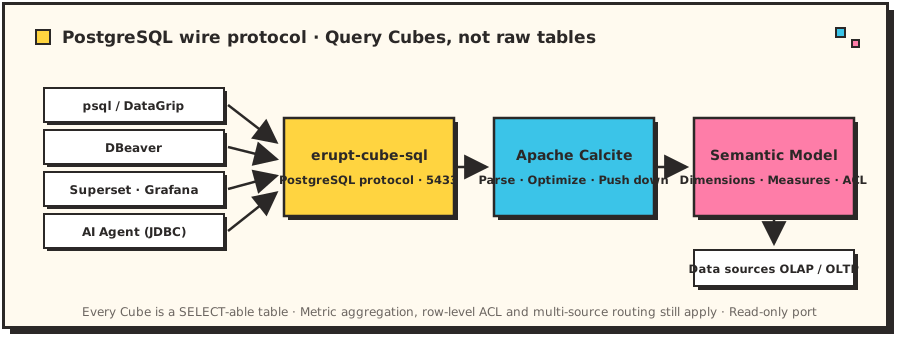
The erupt-cube-sql module exposes the semantic layer over the PostgreSQL wire protocol: every cube becomes a table you can SELECT from directly, so any PostgreSQL-compatible client — psql, DataGrip, DBeaver, Superset, Metabase, Grafana, or an AI agent speaking JDBC — can query the semantic layer while metric definitions stay centralized in the model.
Why a SQL port
Drag-and-drop analysis serves business users, but data engineers, external BI tools, and AI agents prefer to speak SQL. The SQL port lets them reuse the same semantic layer: they query cubes, not raw tables — metric aggregation logic, row-level permissions, and multi-datasource routing all still apply.
Quick Start
1. Add the Dependency
<dependency>
    <groupId>xyz.erupt</groupId>
    <artifactId>erupt-cube-sql</artifactId>
    <version>${LATEST-VERSION}</version>
</dependency>
2. Configure
erupt:
  cube:
    sql:
      enable: true        # default true; enabled once the dependency is present
      show-sql: true      # log every SQL received on the port (default true)
      bind: 127.0.0.1     # listen address; use 0.0.0.0 to serve externally
      port: 5433          # listen port
      username: erupt     # connection username
      password:           # empty = trust mode (no auth); set a value to enable md5 auth
3. Connect
psql -h 127.0.0.1 -p 5433 -U eruptOr any PostgreSQL JDBC connection string:
jdbc:postgresql://127.0.0.1:5433/eruptQuery Model
Cubes as Tables
Every @EruptCube class is a table whose name is the class name (case-insensitive, write it however you like):
select category, sum(revenue) as revenue
from SalesCube
group by category
order by category;
Measures Aggregate Automatically
Measure columns (@Measure) carry their aggregation semantics — projecting a measure directly needs no hand-written GROUP BY; it aggregates at the grain of the projected dimensions:
-- equivalent to grouping by region_code and summing revenue
select region_code, revenue from SalesCube;
Predicate Pushdown
- Dimension filters (
=,IN,LIKE 'xx%', ...) push down into the cube'sWHEREand run on the underlying data source; - Conditions on measures are routed to a
HAVINGclause at the projected grain:
-- revenue is a measure, so this generates HAVING sum(revenue) > 1000
select region_code, revenue from SalesCube where revenue > 1000;- Expressions that cannot push down (e.g.
upper(category) = 'X',ORacross columns) are evaluated in memory by Calcite — results stay correct.
Query Views (Explore)
Explores with joins or fixed filters are exposed as separate tables named "Cube.explore":
select continent, revenue from "SalesCube.with_region" order by continent;Query Parameters (@Parameter)
@Parameter fields arrive as WHERE equality conditions. They do not filter the result set — they bind the Velocity template context that drives the cube's dynamic base SQL:
select sum(revenue) as revenue from SalesCube where category_filter = 'Clothing';Cross-Cube Joins
Cubes can be joined directly; Calcite computes the join in memory:
select r.continent, sum(s.revenue) as revenue
from SalesCube s
  join RegionCube r on s.region_code = r.region_code
group by r.continent;
Model Discovery
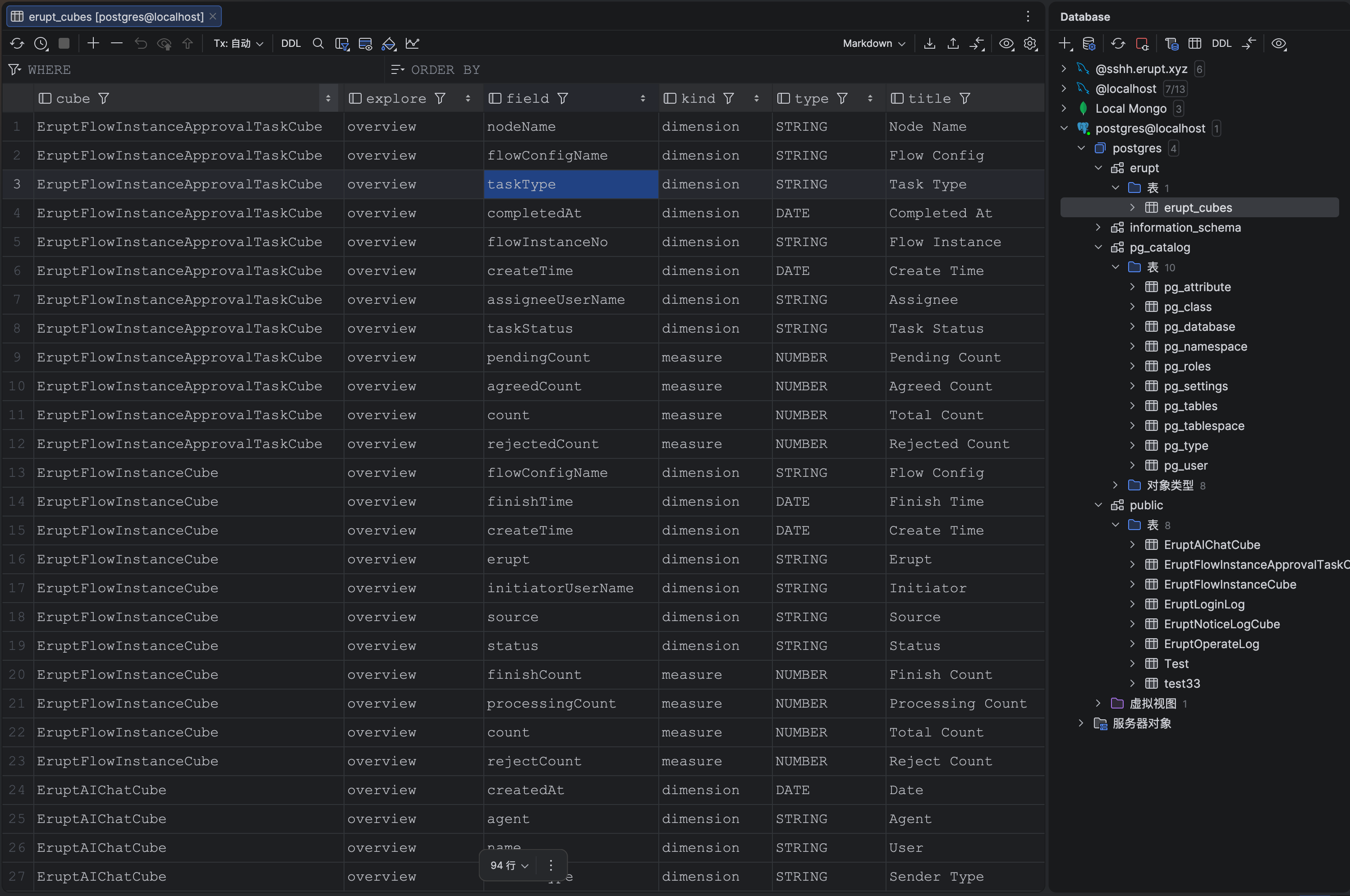
The virtual table erupt_cubes lists all cubes, explores, and fields; pg_tables / information_schema work too:
select distinct cube from erupt_cubes;
select tablename from pg_tables;
Client Compatibility
The port ships a pg_catalog emulation (pg_class, pg_attribute, pg_type, pg_namespace, ...) that fully supports pgjdbc's DatabaseMetaData API and DataGrip's object introspection — GUI tools browse cube schemas and offer column-name completion exactly as they would against a real PostgreSQL database.
- Both simple and extended query protocols are supported (prepared statements, text/binary result encoding, bind parameters)
- Session statements (
SET/SHOW/BEGIN...) are answered with PostgreSQL semantics LIMIT/OFFSET,ORDER BY,DISTINCT, column projection and casts (e.g.col::bigint) all work
Read-Only Semantics
The port is read-only: INSERT / UPDATE / DELETE / DDL are rejected with SQLSTATE 25006 (read_only_sql_transaction), matching a PostgreSQL standby, and transaction_read_only reports on. The connection remains usable for queries after a rejected write.
Custom Executor
Real SELECTs are parsed and executed by the Apache Calcite-based CalciteCubeSqlExecutor by default (with semantic-layer pushdown). To customize execution, register your own CubeSqlExecutor bean to replace it entirely:
@Component
public class MyCubeSqlExecutor implements CubeSqlExecutor {
    // custom SQL → semantic-layer query parsing and execution
}
Typical Scenarios
| Scenario | Description |
|---|---|
| Direct BI connection | Superset / Metabase / Grafana connect via their PostgreSQL data source — no plugins |
| AI agents querying data | Agents ask questions in SQL over JDBC/psql; the semantic layer guarantees metric definitions and data permissions |
| Ad-hoc engineering queries | Explore cubes in DataGrip / DBeaver instead of hand-writing raw-table SQL |
| Downstream consumers | Any language with a PostgreSQL driver (Python, Go, Node.js) can read semantic-layer data |
Contributors
 YuePeng
 Claude Fable 5.1