
Erupt AI Dev v2.4.0+
erupt-ai-dev brings coding agents into the delivery process: a project spans several git repositories, requirements enter a requirement pool, and once approved a coding CLI installed on the server (Claude Code, Codex, OpenCode, ...) implements them in a worktree of their own. An optional QA agent checks the change, then a human accepts it and pushes. Execution is server-managed; every git operation goes through the support module erupt-git, which speaks only the git protocol, so GitHub, GitLab, Gitee, Gitea or a plain git server all work.
Minimum version: 2.4.0
Setup
- Add the dependency (requires erupt-ai; it pulls in the support module
erupt-git, so git 2.20+ must be on the server's PATH):
<dependency>
    <groupId>xyz.erupt</groupId>
    <artifactId>erupt-ai-dev</artifactId>
    <version>${erupt.version}</version>
</dependency>
erupt-spring-boot-starter-all already includes this module.
Install at least one coding CLI on the server that will run agents (see Executors and Coding CLIs) and put its API key under
erupt.ai-dev.executor.env.After startup a new AI Dev menu group appears with Requirement Pool and Dev Project. The Requirement menu exists but stays hidden: the pool page writes through its add API and row operations, so validation, permissions and the operation log remain erupt's own.
Lifecycle
A requirement without QA review skips VERIFYING and goes from RUNNING straight to ACCEPTANCE. Stages move only through the actions below, never by editing the record; the definition is frozen while a requirement is queued, running or delivered.
| Action | From | Who | Effect |
|---|---|---|---|
| Submit for Review | DRAFT | any member | REVIEW; the reviewer is notified |
| Approve and Run | REVIEW | reviewer / owner / maintainer | QUEUED; an optional note goes to the agent; the approver becomes the reviewer when none was assigned |
| Reject | REVIEW | reviewer / owner / maintainer | back to DRAFT, a reason is required |
| Stop | RUNNING / VERIFYING | any member | kills the agent process, FAILED |
| Retry | FAILED | any member | QUEUED, with an optional instruction; the agent resumes its previous session |
| Request Changes | ACCEPTANCE | reviewer / owner / maintainer | QUEUED, the instruction is required; the agent resumes its previous session |
| Accept and Push | ACCEPTANCE | reviewer / owner / maintainer | rebases and pushes every repository; DELIVERED on success |
| Cancel | not RUNNING / VERIFYING / DELIVERED | any member | CANCELLED; the workspace is discarded |
| Clean Up Workspace | DRAFT / REVIEW / FAILED / CANCELLED | any member | removes worktrees, uncommitted changes and the local branch; the next run starts from the latest base |
| Change Priority | any | any member | priority is scheduling, not definition |
| Delete | not QUEUED / RUNNING / VERIFYING / DELIVERED | creator / owner / maintainer | removes the requirement with its sessions, logs, deliveries and workspace; nothing pushed is touched |
Four eyes
By default the creator of a requirement cannot approve or reject it: another reviewer has to. Turn on Self Review in the project to allow it.
Notices
With erupt-notice on the classpath, stage changes are sent as in-app notices (scene code ai_dev) that link straight to the requirement. The person who took the action is never told about it:
| Event | Receivers |
|---|---|
| Submitted | the assigned reviewer, else every reviewer, owner and maintainer of the project |
| Approved / Rejected | the creator (the body carries the reviewer's comment) |
| Acceptance / Failed / Delivered | creator and reviewer |
Requirements still RUNNING or VERIFYING when the server restarts are marked FAILED ("Interrupted by a server restart"); a retry continues them.
Projects
Created under the Dev Project menu. The project list shows a user only the projects they created (super admins see all); the pool follows membership.
| Field | Description |
|---|---|
| Code | Unique identifier, also the directory name on the server: lower case letters, digits and -; cannot be changed later |
| Name | Display name |
| Repositories | The git repositories the project spans, see below |
| Members | Only members see the project, see below |
| Self Review | Off by default: the creator of a requirement cannot approve or reject it |
| AGENTS.md | Markdown project instructions. Written into the workspace root of every agent run, next to the repositories, together with a CLAUDE.md that reads @AGENTS.md, so Claude Code and Codex both pick it up |
| Active Workspaces | Requirement workspaces of the project still on the server |
Row operations: Sync Repositories (re-fetches the bare clones; saving the project also syncs them in the background) and Clean Up Leftover Workspaces (removes the workspaces of delivered, cancelled and since-deleted requirements; owners and maintainers only).
Repositories
| Field | Description |
|---|---|
| Alias | Directory name inside the workspace, e.g. web or api: lower case letters, digits and - |
| Git URL | https, ssh or git@host:org/repo.git; never put credentials in the URL, such a URL is refused |
| Base Branch | Worktrees start from the latest origin of this branch; blank takes the remote's default branch. Focusing the field lists the remote's branches |
| Target Branch | Branch a delivery is pushed to after rebasing; blank pushes to the requirement's own branch req/req-n |
| Credential | Key of an entry under erupt.ai-dev.credentials; blank for public repositories |
| Sync Status / Message / Synced At | State of the server-side bare clone: PENDING, SYNCING, READY, FAILED |
Saving validates the URL, the branch names, that the credential exists and may be used for that host, and that the base branch really is on the remote.
Members and Roles
| Role | Permissions |
|---|---|
| OWNER | Manages settings, repositories and members; the creator becomes an owner automatically |
| MAINTAINER | Same as owner |
| REVIEWER | Approves / rejects requirements, requests changes, accepts and pushes |
| MEMBER | Sees the project, creates requirements, submits / retries / stops / cancels |
A non-member never lists, opens or picks a project; super admins see all. A project keeps at least one owner or maintainer. Every entity carries a tenant id, and every path on disk is prefixed with the tenant.
Workspaces
{root}/repos/{tenant}/{project}/{alias}.git            bare clone, synced in the background after each save
{root}/worktrees/{tenant}/{project}/{req-n}/{alias}    worktree; {req-n} is the agent's working directory
A requirement's workspace (one worktree per repository on the branch req/req-n) lives as long as it can still run: delivery removes it, and so does cancelling. The requirement page shows it per repository (present or not, commits ahead of the base, uncommitted files; the server path for super admins). Every path segment is validated and checked against the root.
Requirement Pool
AI Dev → Requirement Pool opens #/ai-dev/pool. The page header picks the current project. The list comes as a table or a board (remembered per browser), filtered by "All / Mine / To review", grouped by status (To do, In progress, Awaiting acceptance, Failed, Delivered, Cancelled) and searchable by code or title. Active requirements refresh every 5 seconds.
The New requirement dialog:
| Field | Description |
|---|---|
| Title | One line on what should change |
| Description | Markdown: background, expected behaviour and acceptance criteria; the agent works from this text |
| Priority | HIGH / MEDIUM / LOW |
| Repositories | At least one; each gets its own worktree |
| Executor | Only the coding CLIs installed on the server, preselecting the one you used last in this project |
| Model | Model id passed to the executor, blank for its default; CLIs that can list their models get suggestions |
| QA review | A second run checks the change before acceptance |
The detail page has four steps, Define / Review / Run / Deliver:
- Define: the requirement document, read-only while it runs; plus the workspace state of every repository.
- Review: the review history (who approved or rejected, comment, time). A rejection needs a reason; an approval may carry a note that is handed to the agent with the requirement.
- Run: the sessions (developer, QA and each retry are one session each, with status, time spent, tokens and cost) and the agent log followed live: prompt, text, tool calls with their results, final answer. Agent output is shown as text only, never rendered as HTML. When failed or awaiting acceptance, a composer at the bottom sends an instruction and the agent resumes its last session.
- Deliver: the diff of every repository against its base branch, in unified or split layout, with a file navigator, a file-name filter and per-file folding; below it the deliveries per repository (branch, commit, status, message). A very large diff shows only its beginning, the file list stays complete.
Each repository carries its delivery state in the list and the detail: not pushed, pushed (→ branch), no changes, conflict, rejected, failed.
Project scope with @EruptScope
DevProjectScope is an @EruptScope form whose only field is a "Current Project" choice of the user's own projects. DevRequirement declares it, so the page header picks a project once and every list, detail and write follows it. The options are re-checked on every request, so a hand-edited erupt-scope header cannot reach a project the user is not a member of.
The pool's read API lives under /erupt-api/ai-dev/pool/*, guarded by the page's menu and by project membership.
Executors and Coding CLIs
One run goes through these steps:
- The executor polls the queue (every 10 seconds by default) and claims a QUEUED requirement with a conditional update, so two instances never take the same one.
- Workspace: each repository is fetched and a worktree on
req/req-nis checked out fromorigin/<base branch>; AGENTS.md and CLAUDE.md are written. A retry keeps the existing worktree. - Developer agent: the requirement's executor runs in the workspace with the prompt on stdin. Every message (text, tool call, tool result, final answer) is stored as an Agent Event as it arrives. A retry or a change request resumes the previous CLI session (
--resume) and passes the new instruction. - Anything the agent left uncommitted is committed in its name (
[email protected]), so nothing is lost. - QA review (optional): a second run of the same executor inspects the change read-only and reports its verdict through the MCP tool
devReportVerdict. - ACCEPTANCE: a human reviews.
Installed means enabled
There is no executor.enabled switch: an instance runs agents as soon as a coding CLI is installed on it, and approving a requirement needs its executor on the current instance. The server's PATH (or a configured absolute path) is rescanned every 30 seconds, so a CLI installed later shows up in the picker without a restart.
| Code | CLI | Headless mode | Session resume | MCP |
|---|---|---|---|---|
claude | Claude Code | claude -p --output-format stream-json | yes | --mcp-config file |
codex | Codex | codex exec --json | yes | -c mcp_servers.erupt.*, token in the environment |
opencode | OpenCode | opencode run --format json --standalone | yes | OPENCODE_CONFIG_CONTENT |
kimi | Kimi Code | kimi --print --output-format stream-json | yes | --mcp-config-file |
cursor | Cursor CLI | cursor-agent -p --output-format stream-json --force, prompt as the last argument | yes | no: marker lines |
qwen | Qwen Code | qwen --output-format stream-json --yolo | yes | no: marker lines |
| any key | a plain CLI | prompt on stdin (or as the last argument), text out | no | no: marker lines |
Claude Code, Cursor CLI and Qwen Code print the same stream-json, read by one parser (StreamJsonRunner).
A built-in CLI takes its binary, label, args and icon (an image URL; without one the page draws a badge of its initials) from executor.clis.<code> when set. Any other key adds a plain CLI, so other tools need no code:
erupt:
  ai-dev:
    executor:
      clis:
        # args: that CLI's own non-interactive flags
        zcode: {binary: zcode, label: Z Code, args: ["-p"]}
A CLI without a closing result event is judged by its exit code, its last text being the answer. For a CLI that needs real parsing, implement CodingAgentRunner as a Spring bean.
Progress over MCP
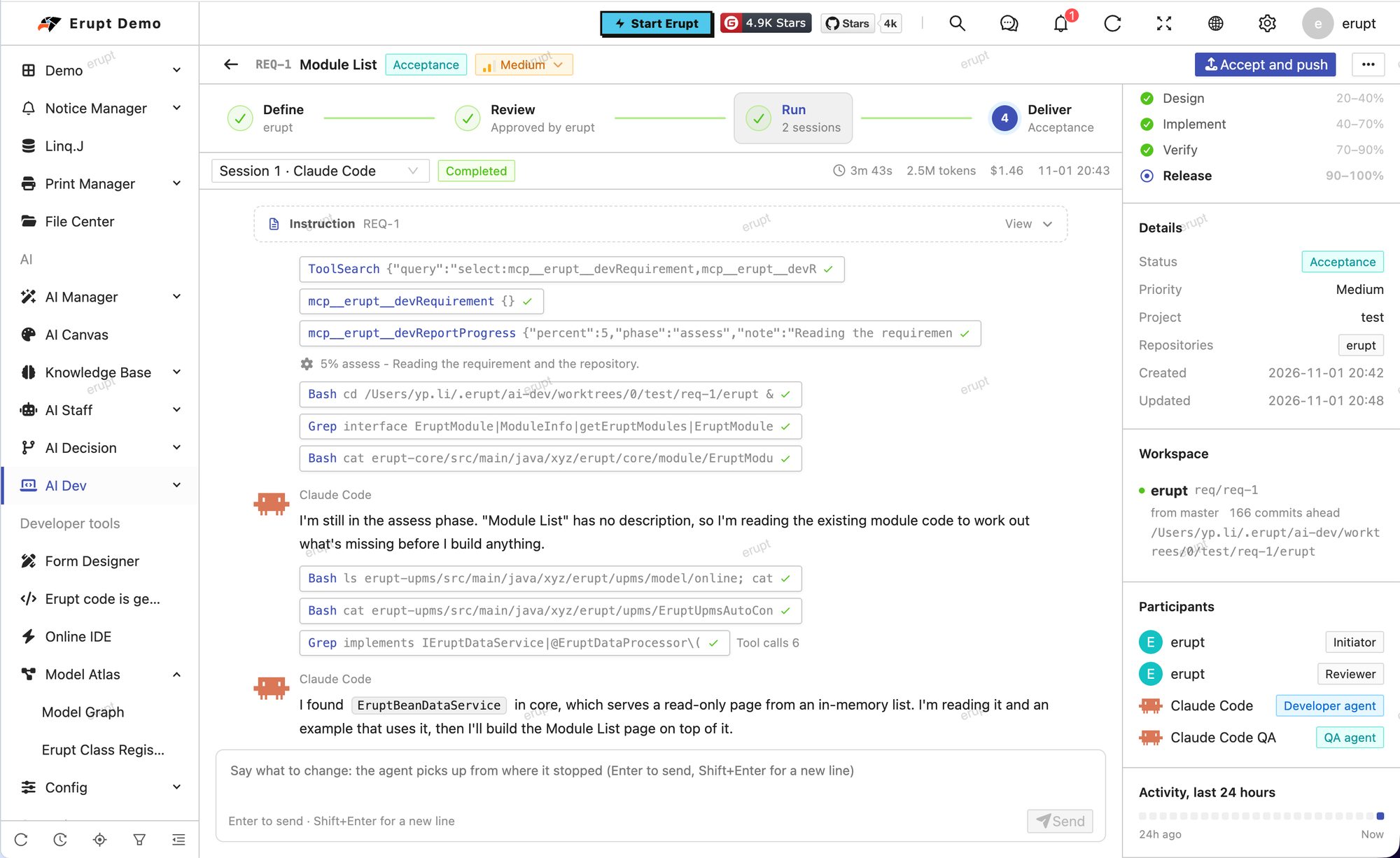
Each run reaches erupt-ai's MCP endpoint at /mcp with a token of its own:
- Token: a random bearer token, minted for the run and revoked when it ends.
DevMcpGrantsis anMcpAuthenticator, so the token works whether or noterupt.ai.mcp.server-enabledis on, and it lists and calls only the tools of its role. - Config file: the agent's
--mcp-configfile is written under{root}/run/with mode 0600 and deleted after the run. - Isolation:
--strict-mcp-configkeeps the account's other MCP servers out of the run. - Tools:
DevToolsis an@AiToolbox(exposed = false)bean, so chat agents and user tokens never see them.devRequirementserves both roles;devReportProgressthe developer;devReportVerdictthe QA agent. - erupt's own tools: the run also gets erupt's
@AiToolboxtools, acting as the requirement's creator in their tenant, limited to what that creator's AI roles allow in AI chat: the agent reads erupt models and their data the way the creator could, no further. What it reads goes to the model provider with the rest of its context. - Reach: a token touches only its own requirement.
- Address:
http://127.0.0.1:<port><context-path>/mcpby default. When the agent runs elsewhere, in a container for example, setexecutor.mcp-url.
A CLI without MCP uses marker lines instead: the developer prints PROGRESS <0-100> <phase> on a line of its own (phases assess, design, implement, verify), and the QA agent ends with VERDICT: PASS or VERDICT: FAIL <reason>. Progress only rises, and 100% is kept for the end of the run.
Follow a session live with GET /erupt-api/ai-dev/session/{id}/events?after={seq}, at most 500 lines per call.
Acceptance and Delivery
With QA review on, the same executor runs once more after the developer: it reads the change, runs the tests that cover it, checks every acceptance criterion and reports PASS or FAIL with a reason. The verdict shows on the requirement; a failed one is flagged "QA failed" in the list, but whether to push stays a human decision.
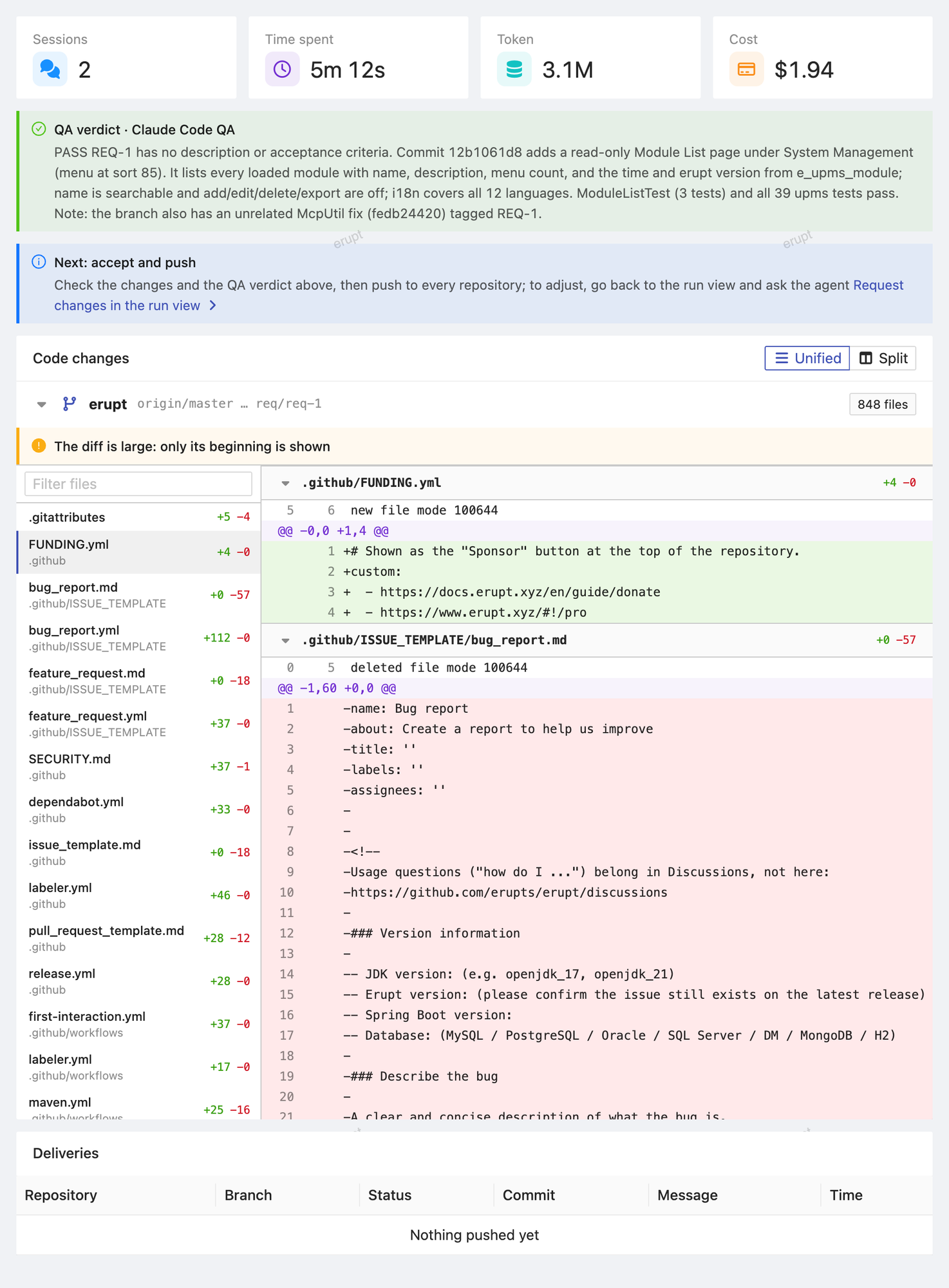
Accept and Push is for reviewers, owners and maintainers:
- Every repository is fetched; a repository with a target branch gets
req/req-nrebased ontoorigin/<target branch>. - Nothing is pushed until every repository rebased cleanly: one conflict stops all of them, the conflicting files are recorded in the deliveries and the status message, and the requirement stays in ACCEPTANCE for a change request.
- A repository with a target branch is pushed fast-forward only (never forced); one without gets
req/req-npushed; a repository without changes is skipped. - Each push is recorded as a Delivery; once all succeed the requirement is DELIVERED and the worktrees are removed (the branches stay).
| Delivery status | Meaning |
|---|---|
PUSHED | pushed, or the remote was already up to date |
SKIPPED | the repository has no changes |
CONFLICT | rebasing onto the target branch conflicted, nothing pushed |
REJECTED | refused by the remote, typically a protected branch |
FAILED | the push failed, e.g. the target branch moved on after the rebase |
PENDING | not pushed because another repository conflicted |
Running Agents Safely
An agent edits files and runs commands with the server's account, so:
- Install a CLI on one instance only, ideally a container or VM dedicated to it.
- The agent process starts from a clean environment:
PATH,HOME,LANGand the like, pluserupt.ai-dev.executor.envonly. Server secrets such as database passwords never reach it. - Git credentials never reach it either: erupt does every fetch and push itself. A credential goes to git only through the child process environment, never on a command line, in a URL, in
.git/configor on disk. - A credential goes only to the hosts listed under
erupt.ai-dev.credentials.<key>.hosts(github.com,*.example.com, or*for any). None listed means it is never used, so a repository URL typed into a project cannot carry it to another server. - Claude Code also loads the account's own
~/.claudesettings and hooks. PointCLAUDE_CONFIG_DIRat a dedicated directory to keep them apart. executor.clis.<code>.argsgrants the tools a headless run may use. For Claude Code,Bashmeans any command on that host.- Repository hooks never run on the server; git commands run as an argument array, never through a shell, with refs and paths validated first.
erupt:
  ai-dev:
    executor:
      max-concurrent: 2
      run-timeout-minutes: 60
      env:
        ANTHROPIC_API_KEY: ${ANTHROPIC_API_KEY}
        CLAUDE_CONFIG_DIR: /data/erupt-ai-dev/claude
        GIT_AUTHOR_NAME: Claude Code
        GIT_AUTHOR_EMAIL: [email protected]
        GIT_COMMITTER_NAME: Claude Code
        GIT_COMMITTER_EMAIL: [email protected]
      clis:
        claude:
          binary: claude
          args: ["--permission-mode", "acceptEdits", "--allowedTools", "Read,Edit,MultiEdit,Write,Glob,Grep,Bash"]
Properties
erupt:
  ai-dev:
    root: /data/erupt-ai-dev          # repositories and workspaces; blank = ~/.erupt/ai-dev
    credentials:                      # a repository names its entry by key; secrets stay here, never in the database
      github:
        token: ${GITHUB_TOKEN}
        hosts: [github.com]
      internal:
        username: deploy
        password: ${GIT_INTERNAL_PASSWORD}
        hosts: [git.internal.example.com]
      gitlab-ssh:
        ssh-key: /etc/erupt/keys/gitlab
        hosts: ["*.gitlab.example.com"]
    executor:
      max-concurrent: 2               # agent runs at the same time on this instance
      poll-seconds: 10                # how often the queue is checked
      run-timeout-minutes: 60         # a run still going after this is killed
      mcp-url:                        # where the agent reaches the MCP endpoint; blank = http://127.0.0.1:<port>/mcp
      env:                            # added to the agent's clean environment
        ANTHROPIC_API_KEY: ${ANTHROPIC_API_KEY}
      clis:                           # overrides for a built-in CLI, or a new plain CLI
        claude:
          binary: claude              # executable, from PATH unless absolute
          label: Claude Code          # shown in the executor picker
          icon:                       # image URL; blank draws a badge of its initials
          args: [...]                 # extra arguments, replacing the built-in defaults when set
prompt-as-argument: false # plain CLI: prompt as the last argument instead of stdin| Property | Default | Description |
|---|---|---|
erupt.ai-dev.root | ~/.erupt/ai-dev | Root of the bare clones, worktrees and per-run MCP config files |
erupt.ai-dev.credentials.<key> | — | One of token, username + password or ssh-key, plus the hosts allow-list |
erupt.ai-dev.executor.max-concurrent | 2 | Concurrent runs on this instance |
erupt.ai-dev.executor.poll-seconds | 10 | Queue polling interval |
erupt.ai-dev.executor.run-timeout-minutes | 60 | Timeout of one run |
erupt.ai-dev.executor.mcp-url | local address | MCP endpoint address when the agent does not run on the server itself |
erupt.ai-dev.executor.env | — | Environment of the agent process; the CLI's API key goes here |
erupt.ai-dev.executor.clis.<code> | — | Built-in override or plain CLI: binary, label, icon, args, prompt-as-argument |
erupt-git's own properties:
erupt:
  git:
    binary: git                 # executable, from PATH unless absolute
    timeout-seconds: 600        # per command, clone included
    allow-local-remote: false   # allow file:// remotes
    committer-name: erupt       # committer of commits erupt writes or rebases
    committer-email: erupt@localhost
Tables
| Table | Contents |
|---|---|
e_ai_dev_project | Dev projects (unique per tenant and code) |
e_ai_dev_project_repo | Project repositories |
e_ai_dev_project_member | Project members |
e_ai_dev_requirement | Requirements, numbered REQ-n per project by seq |
e_ai_dev_requirement_review | Reviews: approval or rejection, comment, reviewer |
e_ai_dev_requirement_delivery | Deliveries: one row per requirement × repository push |
e_ai_dev_agent_session | Agent sessions: role, executor, CLI session id, status, tokens and cost |
e_ai_dev_agent_event | Session log lines, ordered by seq |
Contributors
 YuePeng