
Quick Start
Modules
erupt-cube consists of several sub-modules that can be imported on demand:
| Module | Description |
|---|---|
erupt-cube-semantic | Core semantic model engine: annotation scanning, SQL generation, multi-datasource execution |
erupt-cube-puzzle | Visualization: drag-and-drop dashboards, charts, filters |
erupt-cube-design | Visual modeling: define semantic models without annotations |
erupt-cube-metric | Metric management |
erupt-cube-sql | SQL port: exposes semantic models over the PostgreSQL protocol, see SQL Port |
Build the Source and Install Locally
Pull the source code, check out the tag for your version, then run the following Maven command in the project root to install to your local repository or private registry:
bash
mvn -D skipTests=true installAdd Dependencies
Add the following dependencies to your erupt project and restart (requires erupt 1.13.4 or above):
xml
<!-- Visualization capabilities -->
<dependency>
    <groupId>xyz.erupt</groupId>
    <artifactId>erupt-cube-puzzle</artifactId>
    <version>${LATEST-VERSION}</version>
</dependency>
<!-- Core semantic model engine -->
<dependency>
    <groupId>xyz.erupt</groupId>
    <artifactId>erupt-cube-semantic</artifactId>
    <version>${LATEST-VERSION}</version>
</dependency>
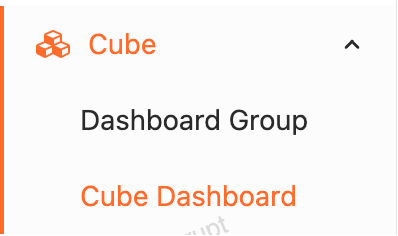
After logging in again you will see the following menu:
Next Steps
- Configure a data source — connect an OLAP warehouse or business database
- Semantic modeling — define dimensions and measures with annotations
- Visual analysis — build dashboards by drag and drop
Contributors
 YuePeng
 Claude Fable 5.1