
Custom Extensions
erupt-flow supports custom flow nodes and global flow behavior — implement email notification, SMS sending, delayed waits, and more without any frontend code.
Custom Nodes
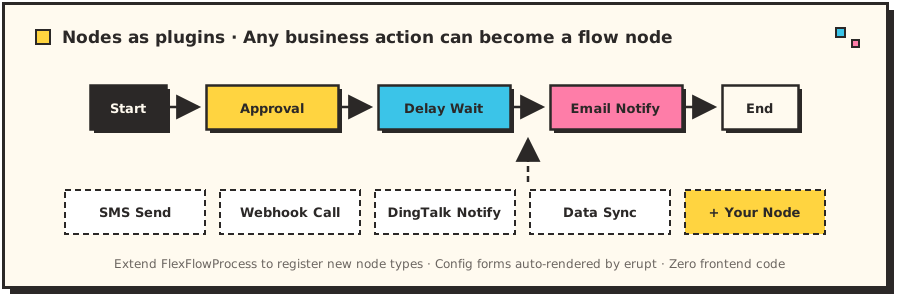
Flow nodes go far beyond approval and CC — delayed waits, email notifications, SMS sending, webhook calls, data sync… any business action can be packaged as a custom node. Once registered, it automatically appears in the flow designer's node palette, ready for business users to drag and drop just like a built-in node — a capability most workflow engines only offer by modifying the engine itself:
TIP
The form bound to a custom node is also an erupt class — the node's configuration UI is auto-rendered by erupt, no frontend development required.
Create a class extending FlexFlowProcess. The generic type is an erupt class defining the form bound to the node. A delay node as an example:
@Component
public class WaitNodeProcess extends FlexFlowProcess<WaitNode> {

    @Resource
    private EruptDao eruptDao;

    // Node code
    @Override
    public String code() {
        return "wait";
    }

    // Node name
    @Override
    public String name() {
        return "Wait Node";
    }

    // Node color
    @Override
    public String color() {
        return "#4CAF50";
    }

    // Node initialization logic
    @Override
    public String prepare(EruptFlowInstance flowInstance, NodeRule nodeRule, WaitNode waitNode) {
        LocalDateTime finishDateTime = switch (waitNode.getWaitType()) {
            case AFTER_MINUTES -> LocalDateTime.now().plusMinutes(waitNode.getInterval());
            case AFTER_HOURS -> LocalDateTime.now().plusHours(waitNode.getInterval());
            case AFTER_DAYS -> LocalDateTime.now().plusDays(waitNode.getInterval());
            case CURRENT_DAY_TIME -> LocalDateTime.of(LocalDate.now(), LocalTime.parse(waitNode.getTime()));
            case FIXED_TIME -> waitNode.getDatetime();
        };
        return finishDateTime.toString();
    }

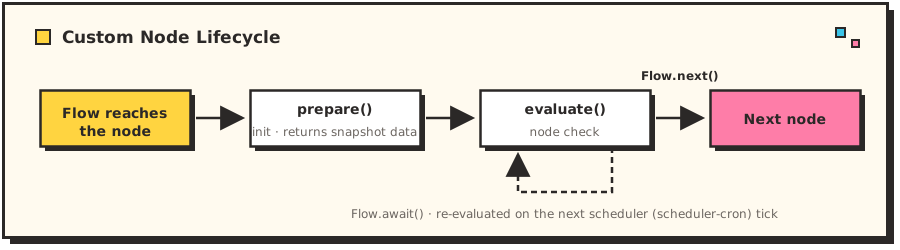
    // Node evaluation logic: return Flow.await() to re-evaluate on the next flow check, Flow.next() to proceed
    @Override
    public Flow evaluate(String data, EruptFlowInstance flowInstance, NodeRule nodeRule, WaitNode waitNode) {
        if (LocalDateTime.parse(data).isBefore(LocalDateTime.now())) {
            return Flow.next();
        } else {
            return Flow.await();
        }
    }

}
The node lifecycle works as follows — prepare() runs when the flow reaches the node, evaluate() is driven periodically by the scheduler, and returning Flow.next() moves on to the next node:
Definition of the form WaitNode bound to the node:
@Getter
@Setter
@Erupt(name = "Wait Node")
public class WaitNode extends BaseModel {

    @EruptField(edit = @Edit(title = "Wait Type", notNull = true, type = EditType.CHOICE, choiceType = @ChoiceType(fetchHandler = WaitType.H.class)))
    private WaitType waitType;

    @EruptField(edit = @Edit(title = "Interval", dynamic = @Dynamic(
            dependField = "waitType", condition = "value=='AFTER_MINUTES'||value=='AFTER_HOURS'||value=='AFTER_DAYS'"
    )))
    private Integer interval;

    @EruptField(edit = @Edit(title = "Time of Day", dynamic = @Dynamic(
            dependField = "waitType", condition = "value=='CURRENT_DAY_TIME'"),
            type = EditType.DATE, dateType = @DateType(type = DateType.Type.TIME))
    )
    private String time;

    @EruptField(edit = @Edit(title = "Fixed Date",
            type = EditType.DATE,
            dateType = @DateType(type = DateType.Type.DATE_TIME, pickerMode = DateType.PickerMode.FUTURE),
            dynamic = @Dynamic(dependField = "waitType", condition = "value=='FIXED_TIME'")))
    private LocalDateTime datetime;

}
TIP
The field linkage above comes from @Dynamic: condition is a JS expression in which value holds the current value of dependField. @Dynamic defaults to match = Ctrl.SHOW and noMatch = Ctrl.HIDE, i.e. show when the condition matches and hide otherwise.
Customize Flow Behavior
Customize global flow logic such as flow number generation and notification delivery.
1. Create a global flow handler class extending EruptFlowProcess and override the relevant methods:
@Component
public class DemoFlowProcess extends EruptFlowProcess {

    // Flow number generation logic
    @Override
    public String genFlowNo() {
        return RandomStringUtils.randomAlphanumeric(8);
    }

    // Custom flow notification logic
    @Override
    public void notification(Long userId, String title, String content) {
        super.notification(userId, title, content);
    }
}
2. Add the @EruptFlowManager annotation to the application entry class to activate it:
@SpringBootApplication
@EruptScan
@EruptFlowManager(DemoFlowProcess.class)
public class EruptDemoApplication {

    public static void main(String[] args) {
        SpringApplication.run(EruptDemoApplication.class, args);
    }

}
Contributors
 YuePeng
 Claude Fable 5.1