
TIMELINE View
Displays data as a vertical timeline: rows are ordered by a date field, each row is one entry on the axis, and entries are grouped under a heading per day. Suits activity feeds, logs, ticket progress and any other data that moves forward in time. Used with @Vis(type = Vis.Type.TIMELINE).
Supported in 2.4.0+
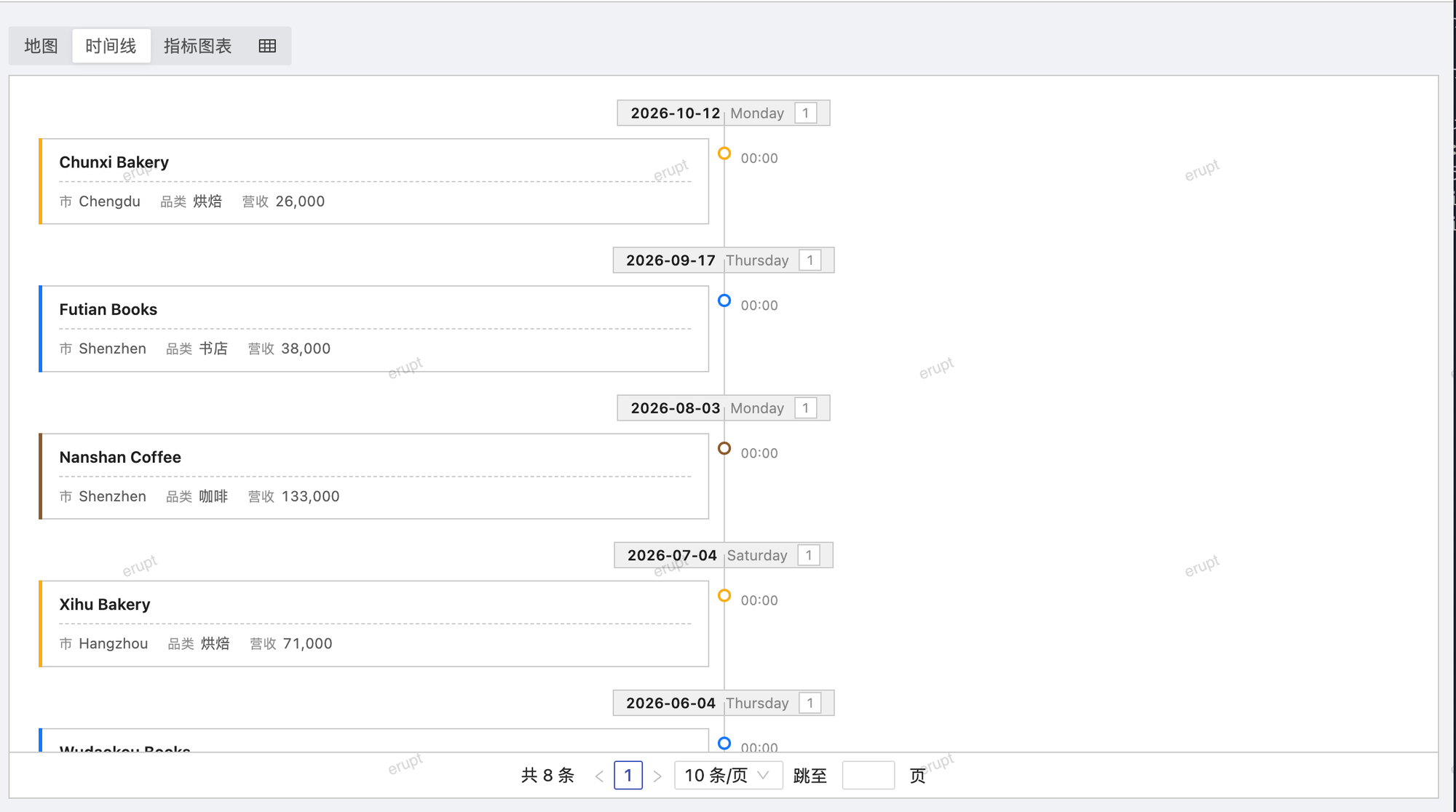
Complete Example
java
@Entity
@Table(name = "t_activity")
@Erupt(
    name = "Project Activity",
    visRawTable = true,
    vis = {
        @Vis(
            code = "timeline",
            title = "Timeline",
            type = Vis.Type.TIMELINE,
            timelineView = @TimelineView(
                dateField  = "happenTime",
                colorField = "color",
                mode       = TimelineView.Mode.ALTERNATE
            )
        )
    }
)
public class Activity extends BaseModel {

    @EruptField(
        views = @View(title = "Title"),
        edit = @Edit(title = "Title", notNull = true)
    )
    private String title;

    @EruptField(
        views = @View(title = "Time", sortable = true),
        edit = @Edit(title = "Time", notNull = true)
    )
    private Date happenTime;

    @EruptField(
        views = @View(title = "Operator"),
        edit = @Edit(title = "Operator")
    )
    private String operator;

    @EruptField(
        views = @View(title = "Color"),
        edit = @Edit(title = "Color", type = EditType.COLOR)
    )
    private String color;

}
@TimelineView Attributes
java
public @interface TimelineView {

    String dateField();                 // date field the entries are ordered by (required)

    String colorField() default "";     // hex color field for the entry dot

    boolean descending() default true;  // newest entries first

    Mode mode() default Mode.LEFT;      // where the entries sit relative to the axis

    enum Mode {
        LEFT,       // entries on the right of the axis, axis on the left (default)
        ALTERNATE,  // entries alternate left and right
        RIGHT       // entries on the left of the axis, axis on the right
    }

}| Attribute | Description |
|---|---|
dateField | Date field name (required); decides the order of the entries and the day each one belongs to. Supports Date, LocalDate, LocalDateTime |
colorField | Optional. Hex color field name (e.g. #FF5733) for the entry dot, useful for telling entry types apart |
descending | Newest first, defaults to true |
mode | Layout: LEFT (default) / ALTERNATE / RIGHT |
Rendering Rules
- Rows are split by the day of
dateField; every day gets a heading with the date, the weekday and the number of entries that day - The first visible column is the entry title, the remaining visible columns are rendered as detail lines under it;
dateFielditself is the axis label and is not repeated in the details - When
dateFieldis a date-time type, the entry also shows its time of day; a plain date only has the day heading - Clicking an entry opens the row for editing / viewing
- Use
fieldVisibility+fieldsto control which columns the entries show
TIP
The timeline keeps the list's pagination: switching pages moves the timeline along with it. Raise the page size to show more entries at once.
Contributors
 YuePeng