
Gantt Chart GANTT
Displays time-axis data as a Gantt chart, with support for grouping, hierarchy, progress, color, predecessor links and milestones. Used with @Vis(type = Vis.Type.GANTT).
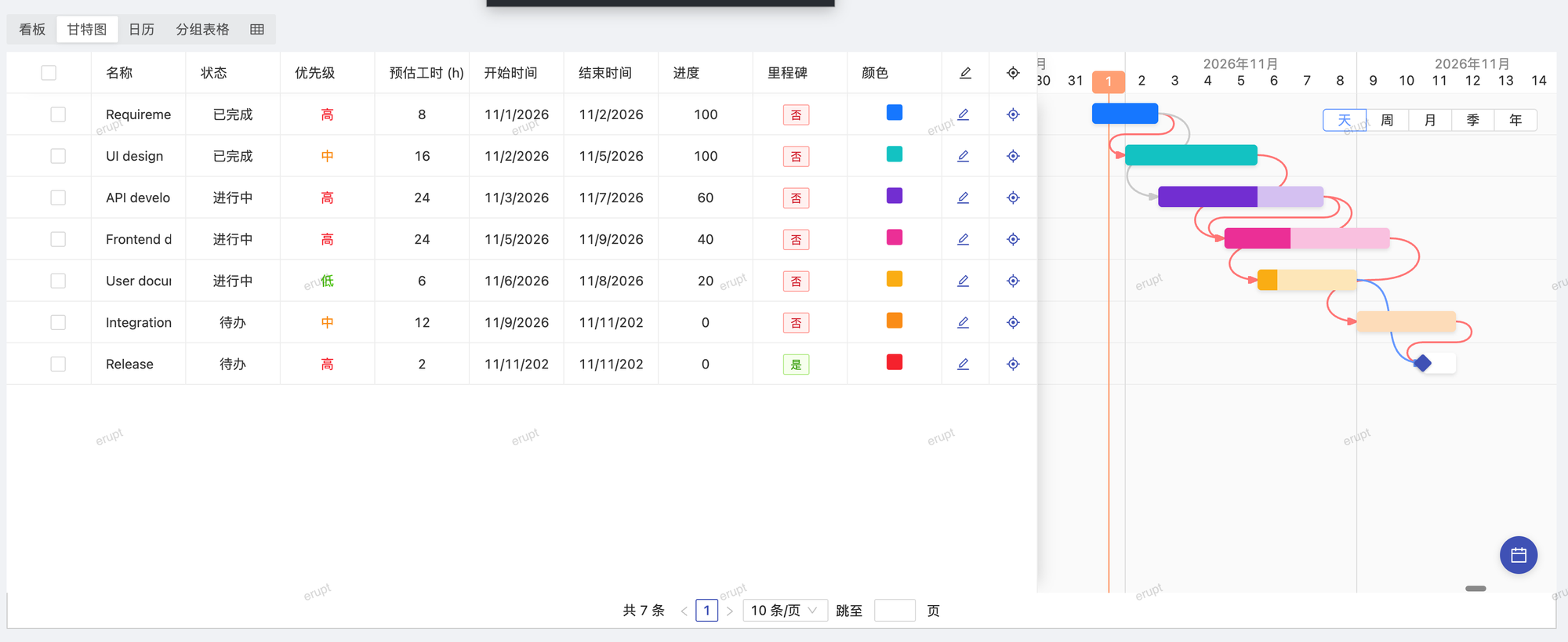
Complete Example
java
@Entity
@Table(name = "t_gantt")
@Erupt(
    name = "Gantt Demo",
    visRawTable = false,
    vis = {
        @Vis(
            title = "Gantt Chart",
            type = Vis.Type.GANTT,
            fieldVisibility = Vis.FieldVisibility.INCLUDE,
            fields = {"name", "type", "color", "progress"},
            ganttView = @GanttView(
                startDateField = "startDate",
                endDateField   = "endDate",
                pidField       = "parent.id",
                colorField     = "color",
                progressField  = "progress",
                groupField     = "type",
                dependencyField = "predecessors",
                milestoneField  = "milestone"
            )
        )
    }
)
public class GanttDemo extends BaseModel {

    @EruptField(
        views = @View(title = "Name"),
        edit = @Edit(title = "Name", notNull = true)
    )
    private String name;

    @EruptField(
        views = @View(title = "Group"),
        edit = @Edit(title = "Group", type = EditType.CHOICE, choiceType = @ChoiceType(vl = {
            @VL(label = "Group 1", value = "1"),
            @VL(label = "Group 2", value = "2")
        }))
    )
    private String type;

    @EruptField(
        views = @View(title = "Start Date", sortable = true),
        edit = @Edit(title = "Start Date", notNull = true)
    )
    private Date startDate;

    @EruptField(
        views = @View(title = "End Date", sortable = true),
        edit = @Edit(title = "End Date", notNull = true)
    )
    private Date endDate;

    @EruptField(
        views = @View(title = "Color"),
        edit = @Edit(title = "Color", type = EditType.COLOR)
    )
    private String color;

    @EruptField(
        views = @View(title = "Progress"),
        edit = @Edit(title = "Progress", type = EditType.SLIDER, sliderType = @SliderType(max = 100))
    )
    private Integer progress;

    // When using hierarchical Gantt, you must expose the parent.id field to the frontend
    // via a show = false @View, otherwise the frontend cannot build the tree structure.
    @ManyToOne
    @EruptField(
        views = @View(title = "pid", column = "id", show = false),
        edit = @Edit(
            title = "Parent Node",
            type = EditType.REFERENCE_TREE,
            referenceTreeType = @ReferenceTreeType(pid = "parent.id", expandLevel = 2)
        )
    )
    private GanttDemo parent;

    // predecessors: a many-to-many collection of the same model, or a single @ManyToOne reference
    @ManyToMany
    @JoinTable(name = "t_gantt_dep",
        joinColumns = @JoinColumn(name = "task_id"),
        inverseJoinColumns = @JoinColumn(name = "predecessor_id"))
    @EruptField(
        views = @View(title = "Predecessors", column = "name"),
        edit = @Edit(title = "Predecessors", type = EditType.TAB_TABLE_REFER)
    )
    private Set<GanttDemo> predecessors;

    @EruptField(
        views = @View(title = "Milestone"),
        edit = @Edit(title = "Milestone", type = EditType.BOOLEAN)
    )
    private Boolean milestone;

}
@GanttView Attributes
java
public @interface GanttView {

    String startDateField(); // start date field (required)

    String endDateField();   // end date field (required)

    String groupField() default "";      // grouping field

    String pidField() default "";        // parent node field, used for hierarchical Gantt charts

    String progressField() default "";   // progress field, value range 0 ~ 100

    String colorField() default "";      // bar color field, value is a hex color code

    String dependencyField() default ""; // predecessor field, drawn as dependency links (2.4.0+)

    String milestoneField() default "";  // boolean field; rows holding true are drawn as milestones (2.4.0+)

}| Attribute | Description |
|---|---|
startDateField | Start date field name (required) |
endDateField | End date field name (required) |
groupField | Grouping field name; tasks with the same value are grouped together |
pidField | Parent node field name; when set, renders a hierarchical tree-style Gantt chart |
progressField | Progress field name; value range 0 ~ 100 |
colorField | Bar color field name; value should be a hex color code (e.g. #FF5733) |
dependencyField | Predecessor field name: a @ManyToOne reference to the same model, or a @ManyToMany collection of it. Each predecessor is drawn as a finish-to-start link to the task |
milestoneField | Boolean field name; a row holding true is drawn as a diamond on its start date instead of a bar |
Dependency Links v2.4.0+
With dependencyField set, the chart draws every task's predecessors as finish-to-start links:
- With edit power, a link can be created by dragging from one bar to another and removed by clicking it; the change is written back to
dependencyFieldthroughDataProxy.beforeUpdate/afterUpdate - A self link, and any link that would form a cycle (the new predecessor already depends on the task, directly or through others), is rejected
- With a
@ManyToOnefield a task has a single predecessor and a new link replaces the old one; with a collection it can have several
The endpoints involved:
| Endpoint | Description |
|---|---|
POST /erupt-api/data/modify/gantt/{erupt}/links | Predecessors of the given tasks; body {visCode, pks}, returns task primary key to the primary keys of its predecessors; empty when dependencyField is not configured |
POST /erupt-api/data/modify/gantt/{erupt}/link | Adds or removes one link; body {visCode, pk, predecessorPk, remove}, requires edit power |
POST /erupt-api/data/modify/gantt/{erupt}/update_date | Saves the new start and end after a bar is moved or resized; body {visCode, pk, startDate, endDate}, requires edit power |
INFO
Drags on the chart (date changes and link changes) publish EruptEditEvent with the pre-change copy, exactly like a form edit, so the operation log, erupt-revision and other modules see them.
Notes
When using a hierarchical Gantt chart (pidField), you must expose the parent node id to the frontend via a show = false @View. Without this, the frontend cannot build the tree structure:
java
@ManyToOne
@EruptField(
    views = @View(title = "pid", column = "id", show = false), // key: hidden but exposed
    edit = @Edit(title = "Parent Node", type = EditType.REFERENCE_TREE,
                 referenceTreeType = @ReferenceTreeType(pid = "parent.id"))
)
private GanttDemo parent;
Contributors
 YuePeng