
Multi Form Blocks MULTI_FORM v2.1.1+
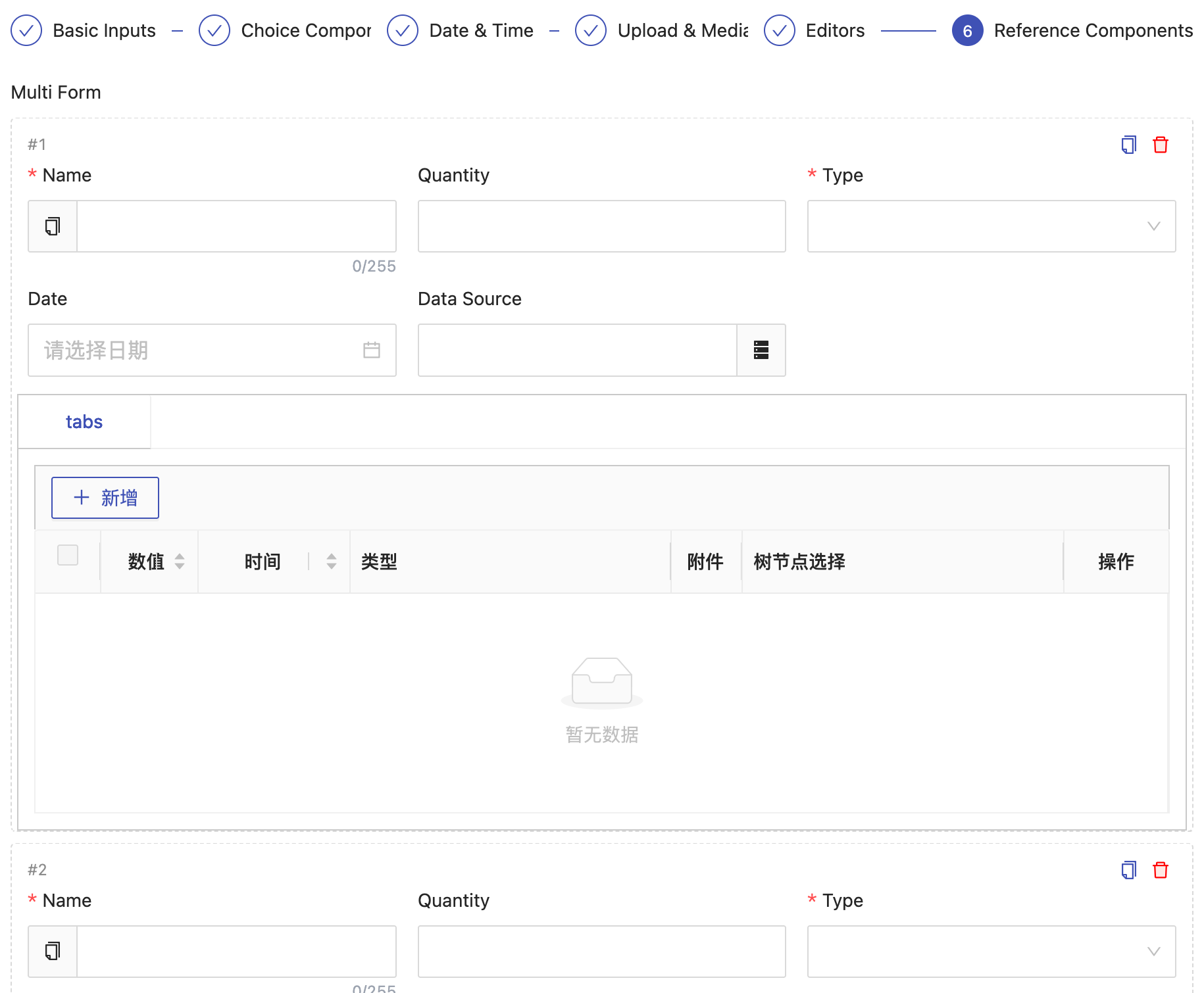
An alternative editing style for one-to-many relations: each child row is rendered as an inline form block (instead of the table layout used by TAB_TABLE_ADD). Blocks can be added and removed in edit mode, and are rendered read-only in view mode. Ideal when the child table has many fields and form-style entry is more intuitive.
Basic Usage
Usage is identical to TAB_TABLE_ADD — just change the edit type to EditType.MULTI_FORM. Corresponds to JPA @OneToMany; child data is cascaded and saved with the parent record:
@OneToMany(cascade = CascadeType.ALL, orphanRemoval = true)
@JoinColumn(name = "main_id")
@OrderBy
@EruptField(
    edit = @Edit(title = "Child Data", type = EditType.MULTI_FORM)
)
private Set<ChildTable> items;
Child entity class:
@Entity
@Table(name = "t_child")
@Erupt(name = "Child Table")
public class ChildTable extends BaseModel {

    @EruptField(views = @View(title = "Name"), edit = @Edit(title = "Name", notNull = true))
    private String name;

    @EruptField(views = @View(title = "Remark"), edit = @Edit(title = "Remark", type = EditType.TEXTAREA))
    private String remark;

}Note: As with
TAB_TABLE_ADD, do not use Lombok's@Dataannotation on the child entity class. Itsequals/hashCodeimplementation onSetcan cause deduplication issues.
Requirements
- The field must be a generic collection. When resolving the model, the framework takes the first generic parameter of the field as the child model type (
Set<ChildTable>andList<ChildTable>both work). A raw type (private Set items;) or a non-collection type fails at startup withComponent modification field is incorrect. - The child class must be an
@Eruptmodel. The child model is built as a complete Erupt view (it goes through the sametabEruptspath asTAB_TABLE_ADDandTAB_TABLE_REFER), so the class must carry@Erupt, and the@EruptField/@Editconfiguration of its fields applies as-is. - Blocks can be nested. A child model may itself declare another
MULTI_FORMor other tab-style fields.
UI Behavior
- Each block carries an index (
#1,#2, …) plus copy and delete actions. Copying strips the primary key — including that of nested one-to-many children — so the copy is saved as a brand-new record. - Once there are more than 5 blocks they are paginated automatically, and adding a block jumps to the last page.
- Adding a block requests initial values from the backend, so defaults configured on
@Editstill apply.
Read-Only View and Printing
The @View display type of a MULTI_FORM field is inferred as ViewType.TAB_VIEW automatically — no need to set it manually:
- Detail view: reuses the same form-block rendering in read-only mode, without the add / copy / delete controls; an empty state is shown when there is no data.
- Print template: the print template generator treats
MULTI_FORMas a container type and expands it into a looping sub-table, exactly as it does forTAB_TABLE_ADD. No extra configuration is required.
Validation
On submit, the framework recursively validates the required fields of every block. When a block fails, the error message is prefixed with the block index, for example:
Child Data #2: Name cannot be emptyLimitations
- Excel import / export is not supported.
MULTI_FORMdeclaresexcelOperator = falseonEditType, consistent with the other one-to-many / many-to-many components such asTAB_TABLE_ADD,TAB_TABLE_REFERandCHECKBOX.
Differences from TAB_TABLE_ADD
| TAB_TABLE_ADD | MULTI_FORM | |
|---|---|---|
| Placement | Tab area at the bottom of the parent form | Inlined at the field's position in the parent form |
| Presentation | Table rows | Inline form blocks |
| Editing | Row edited in a dialog | Edited in place inside the block |
| Field visibility | Only the row being edited is visible | All blocks' fields are visible at once |
| Best for | Few fields, many rows | Many fields, few rows |
| Excel import / export | Not supported | Not supported |
TIP
In formSteps wizard mode, tab-style sub-tables such as TAB_TABLE_ADD are always placed on the last step, whereas MULTI_FORM — being an inline field — is shown together with the DIVIDE step it belongs to.
Contributors
 YuePeng
 Claude Opus 5 (1M context)