
Field Group Panel GROUP
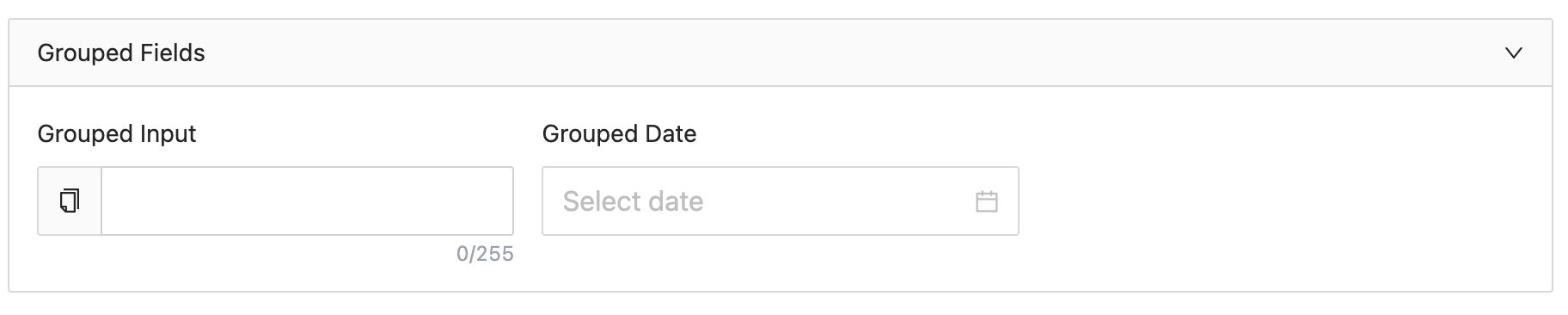
Groups multiple fields into a collapsible panel to reduce form visual complexity — great for hiding non-critical fields behind a disclosure panel. The GROUP field itself stores no data; it acts purely as a layout container.
Added in 2.0.0
Basic Usage
java
@EruptField(
    edit = @Edit(
        title     = "More Info",
        type      = EditType.GROUP,
        groupType = @GroupType(
            fields    = {"remark", "tag", "extra"},
            collapsed = true
        )
    )
)
@Transient
private String groupInfo; // field name is arbitrary — stores no data

@EruptField(
    views = @View(title = "Remark"),
    edit  = @Edit(title = "Remark")
)
private String remark;

@EruptField(
    views = @View(title = "Tag"),
    edit  = @Edit(title = "Tag")
)
private String tag;

@EruptField(
    views = @View(title = "Extra"),
    edit  = @Edit(title = "Extra")
)
private String extra;
@GroupType Attributes
java
public @interface GroupType {

    String[] fields();                 // field names to include in the panel (required)

    boolean collapsed() default false; // whether the panel starts collapsed

}| Attribute | Type | Description |
|---|---|---|
fields | String[] | Array of field names to include; order determines the render order inside the panel |
collapsed | boolean | true = starts collapsed; false = starts expanded (default) |
Behaviour
- The panel title comes from
@Edit(title = "...")on the GROUP field. - A toggle arrow on the right lets the user expand/collapse manually.
- Fields listed in
fieldsare removed from the main form flow and rendered only inside the panel. - The GROUP field itself (e.g.
groupInfoabove) must be annotated with@Transient— it renders no input and is never submitted.
Multiple Groups Example
java
// Group 1: Contact details
@EruptField(
    edit = @Edit(title = "Contact", type = EditType.GROUP,
                 groupType = @GroupType(fields = {"phone", "email", "address"}))
)
private String contactGroup;

// Group 2: System info (starts collapsed)
@EruptField(
    edit = @Edit(title = "System Info", type = EditType.GROUP,
                 groupType = @GroupType(fields = {"createBy", "createTime"}, collapsed = true))
)
private String sysGroup;
Notes
- All field names listed in
fieldsmust exist on the same Erupt class; unrecognised names are silently skipped. - Grouping only affects the form view — the list table (
@View) renders each field independently. - Fields inside a GROUP still participate in form validation (
notNull, etc.). - Nesting is not supported — a
GROUP'sfieldsarray cannot contain anotherGROUPfield name.
Contributors
 YuePeng
 Claude Fable 5.1