
Multi-Select MULTI_CHOICE
A dropdown multi-select or checkbox group. The selected values are stored as a JSON array in a single field.
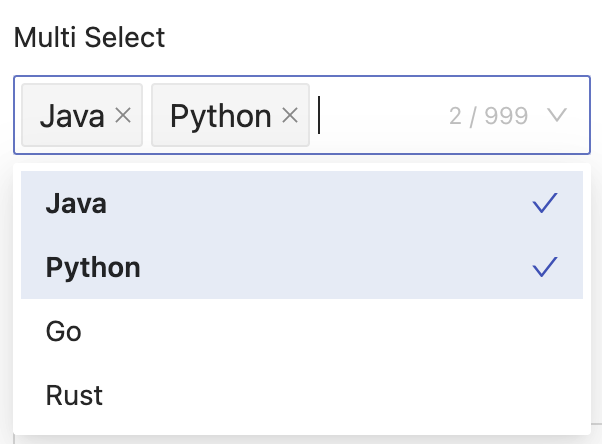
Basic Usage
@JdbcTypeCode(SqlTypes.JSON)
@Column(length = 2000)
@EruptField(
    edit = @Edit(
        title = "Multi-Select",
        type = EditType.MULTI_CHOICE,
        multiChoiceType = @MultiChoiceType(
            vl = {
                @VL(label = "Option A", value = "A"),
                @VL(label = "Option B", value = "B"),
                @VL(label = "Option C", value = "C"),
            }
        )
    )
)
private Set<String> multiChoice;
INFO
@JdbcTypeCode(SqlTypes.JSON) instructs Hibernate to serialize Set<String> as a JSON array stored in a single database column, for example ["A","C"]. The column must be wide enough (recommended length = 2000 or larger).
Dynamic List
Implement ChoiceFetchHandler<T> MyModel 2.0.0+. The field declaration must use @JdbcTypeCode(SqlTypes.JSON) + Set<String>:
@JdbcTypeCode(SqlTypes.JSON)
@Column(length = 2000)
@EruptField(
    edit = @Edit(title = "Skills", type = EditType.MULTI_CHOICE,
                 multiChoiceType = @MultiChoiceType(fetchHandler = SkillFetchHandler.class))
)
private Set<String> skills;@Component
public class SkillFetchHandler implements ChoiceFetchHandler<MyModel> {
@Override
public List<VLModel> fetch(String[] params) {
// Called on initial load — return the full option list
return skillService.findAll().stream()
.map(s -> new VLModel(s.getCode(), s.getName()))
.collect(toList());
}
@Override
public List<VLModel> fetchFilter(MyModel model, String[] params) {
// Linked filter — read other form fields to narrow options
String dept = model.getDept();
return skillService.findByDept(dept).stream()
.map(s -> new VLModel(s.getCode(), s.getName()))
.collect(toList());
}
}Configuration
public @interface MultiChoiceType {

    Type type() default Type.CHECKBOX; // Display mode

    VL[] vl() default {};              // Static option list

    String[] fetchHandlerParams() default {}; // Parameters passed to fetchHandler

    Class<? extends ChoiceFetchHandler>[] fetchHandler() default {}; // Dynamic option source

    String dependField() default ""; // Linked field name (in the same entity)

    enum Type {
        SELECT,   // Dropdown multi-select
        CHECKBOX, // Checkbox group (default)
    }

}
One-to-Many Table Storage
When you need to store multi-select values in a separate join table (rather than as a JSON array in a single column), use JPA's @ElementCollection.
@ElementCollection(fetch = FetchType.EAGER)
// Creates a join table named multi_table; id is the primary key of the current table, forming a one-to-many relationship
@CollectionTable(
    name = "multi_table",
    joinColumns = @JoinColumn(name = "id"),
    foreignKey = @ForeignKey(ConstraintMode.NO_CONSTRAINT)
)
@Column(name = "mid")
@EruptField(
    views = @View(title = "Multi-Select"),
    edit = @Edit(
        title = "Multi-Select",
        type = EditType.MULTI_CHOICE,
        multiChoiceType = @MultiChoiceType(
            vl = {
                @VL(value = "1", label = "A"),
                @VL(value = "2", label = "B"),
                @VL(value = "3", label = "C"),
            }
        )
    )
)
private Set<Integer> mid;
Corresponding multi_table schema:
| Column | Type | Description |
|---|---|---|
id | Same type as the primary key | Foreign key referencing the parent table |
mid | INT / VARCHAR | Stores the selected option value |
TIP
Using Set<Integer> or Set<String> as the field type lets JPA automatically maintain inserts and deletes on the join table. Compared to the default single-column JSON storage, this approach is better suited for scenarios that require querying or joining by option value.
Contributors
 YuePeng
 Claude Opus 5 (1M context)