
自定义首页(home.html)
参数配置分为四篇
- 后端配置(application.yml):
erupt-app、erupt、erupt.upms、erupt.redis-session、erupt.telemetry - 前端配置(app.js):站点信息、Logo、外观默认值、PWA、路由与生命周期回调
- 前端样式(app.css):覆盖或补充界面样式
- 自定义首页(home.html):替换登录后的欢迎页
登录后默认打开的欢迎页由 home.html 提供。它是一个独立的静态页面,以 iframe 形式嵌在工作台的内容区里,因此可以用任意技术编写,不依赖 Angular。
默认首页
不做任何配置时使用框架自带的首页:
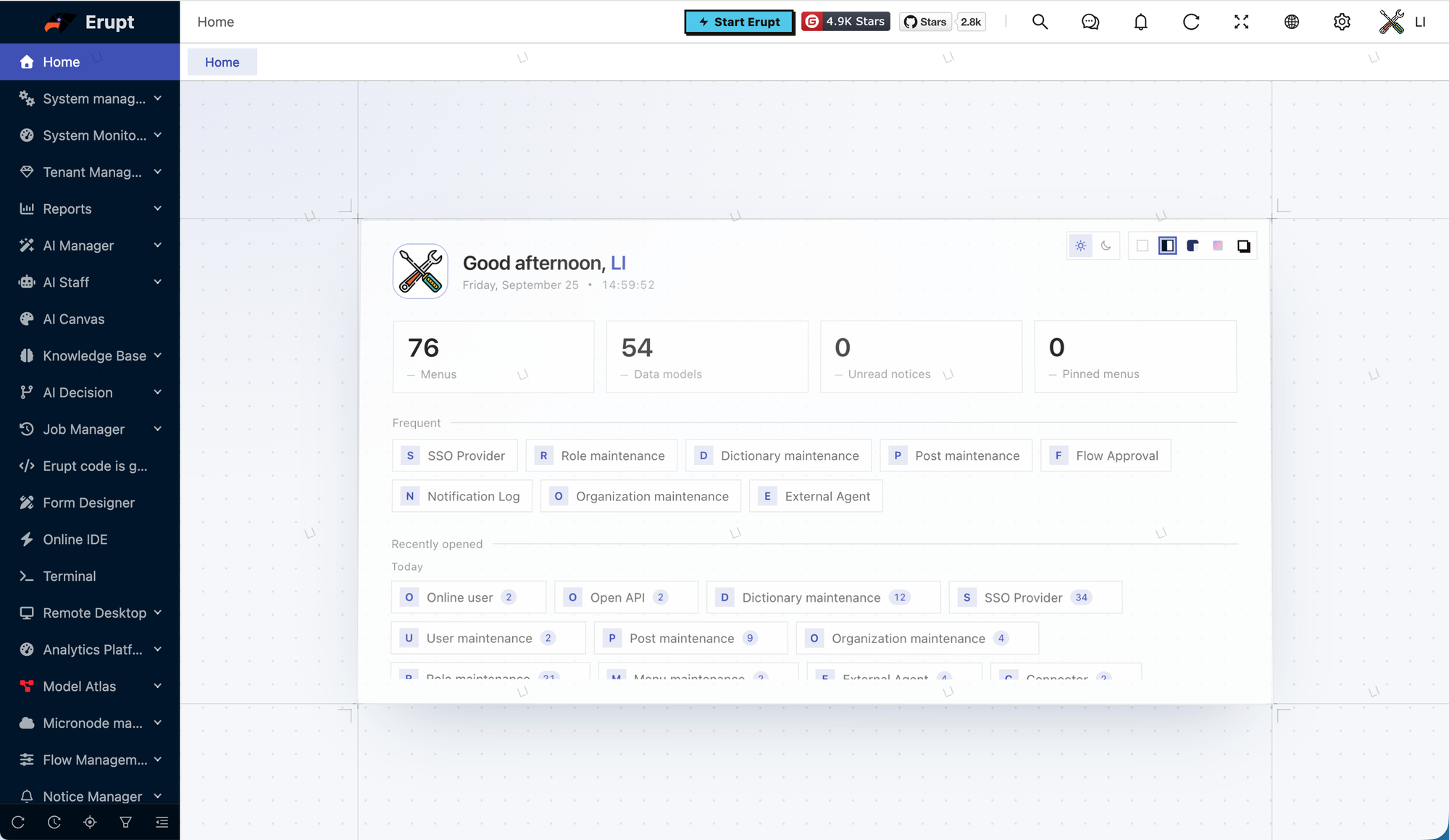
- 按时段问候当前用户,显示可访问菜单数、数据模型数、未读通知数、常用菜单数
- 常用:在左侧菜单点击图钉即可钉在首页;未钉任何菜单时按访问次数展示常去的菜单
- 最近打开:按今天 / 昨天 / 更早分组,点击直接跳转
- 右上角可切换浅色 / 深色与皮肤,与设置抽屉共用同一份保存的选择
替换首页
在项目的 /resources/public/home.html 放置自己的页面即可,同名静态资源会覆盖 erupt-web 内置的版本,无需其他配置:
html
<!DOCTYPE html>
<html lang="zh-CN">
<head>
    <meta charset="UTF-8">
    <meta content="width=device-width, initial-scale=1" name="viewport">
</head>
<body>
    <h1>Hello World</h1>
</body>
</html>
首页的三种来源
- 用户在用户管理中设置了「首页菜单」时,登录后直接打开该菜单,不再加载
home.html - 项目提供了
/resources/public/home.html时加载它 - 否则使用框架自带的默认首页
页面拿到的信息
工作台以下面的地址加载首页,页面可以从中读取会话与语言:
home.html?v=<构建版本>&_token=<会话 token>&_lang=<当前语言>| 参数 | 说明 |
|---|---|
_token | 当前会话 token,调用 /erupt-api/** 时放在 token 请求头 |
_lang | 当前界面语言,如 zh-CN、en-US,放在 lang 请求头可让接口返回对应语言的文案 |
v | 前端构建版本号,仅用于避免缓存 |
同域嵌入时还可以通过 window.parent 读取宿主的 eruptSiteConfig(例如前后端分离部署下的 domain 与 fileDomain)。
javascript
var params = new URLSearchParams(location.search);
var token = params.get("_token"), lang = params.get("_lang") || "zh-CN";
var api = "erupt-api";
try {
    var cfg = window.parent.eruptSiteConfig;
    if (cfg && cfg.domain) api = cfg.domain + "/erupt-api";
} catch (e) { /* 跨域嵌入时读不到宿主对象,保持相对路径 */ }

fetch(api + "/userinfo", {headers: {token: token, lang: lang}})
    .then(r => r.json())
    .then(user => document.getElementById("hello").textContent = "你好," + user.nickname);
默认首页用到的接口可以直接复用:
| 接口 | 用途 |
|---|---|
GET /erupt-api/userinfo | 当前用户的账号、昵称、头像 |
GET /erupt-api/menu | 当前用户可访问的菜单树,可据此渲染自己的导航 |
GET /erupt-api/notice/unread-count | 未读通知数(需引入 erupt-notice) |
GET /erupt-api/erupt-app | 站点信息、版本号、已启用的模块 |
其他数据直接调用 erupt 的数据接口或自定义接口即可,权限校验与在工作台内一致。
与工作台联动
跟随主题:宿主会把当前配色写入 iframe 的 color-scheme,浅色 / 深色切换时首页背景不会出现白底。需要更细的适配时,读取宿主 <html> 上的 dark class 与 --ant-primary-color 变量,并用 MutationObserver 监听变化:
javascript
var root = window.parent.document.documentElement;
function syncTheme() {
    document.documentElement.classList.toggle("dark", root.classList.contains("dark"));
    document.documentElement.style.setProperty("--accent",
        getComputedStyle(root).getPropertyValue("--ant-primary-color").trim());
}
syncTheme();
new MutationObserver(syncTheme).observe(root, {attributes: true, attributeFilter: ["class", "style"]});跳转到菜单:修改宿主的 hash 即可在工作台内打开页面,路径规则与菜单类型对应:
| 菜单类型 | 路径 |
|---|---|
| 表格 / 树 / 表单 | #/build/table/<模型名>、#/build/tree/<模型名>、#/build/form/<模型名> |
| 自定义页面 TPL | #/tpl/<模板名> |
| 报表 / 指标平台 | #/bi/<编码>、#/cube/<编码> |
| 路由 | #<路由> |
javascript
window.parent.location.hash = "#/build/table/EruptUser";切换皮肤:宿主暴露了 window.eruptApplySkin(skin),可传 default / brutalist / liquid-glass / workspace / classic;默认首页右上角的皮肤切换就是这样实现的。
注意
_token出现在 iframe 地址中,首页必须与工作台同域部署,不要把它放到第三方站点- 跨域嵌入时
window.parent不可访问,主题同步与菜单跳转都不可用,只能通过接口获取数据 - 首页不会随工作台的多标签页缓存,每次回到首页都会重新加载,请控制页面体积
完整示例
一个读取用户信息与菜单、按主题着色的最小首页:
html
<!DOCTYPE html>
<html lang="zh-CN">
<head>
    <meta charset="UTF-8">
    <meta content="width=device-width, initial-scale=1" name="viewport">
    <style>
        :root { --accent: #1677ff; --text: rgba(0, 0, 0, .85); }
        html.dark { --text: rgba(255, 255, 255, .88); }
        body { margin: 0; padding: 32px; font-family: -apple-system, "PingFang SC", "Microsoft YaHei", sans-serif; color: var(--text); }
        h1 { font-weight: 600; }
        h1 b { color: var(--accent); }
        .menus a { display: inline-block; margin: 6px 8px 0 0; padding: 6px 12px; border: 1px solid var(--accent); border-radius: 6px; color: var(--accent); text-decoration: none; }
    </style>
</head>
<body>
<h1>你好,<b id="name"></b></h1>
<div class="menus" id="menus"></div>
<script>
    var params = new URLSearchParams(location.search);
    var headers = {token: params.get("_token"), lang: params.get("_lang") || "zh-CN"};
    var root = window.parent.document.documentElement;
    function syncTheme() {
        document.documentElement.classList.toggle("dark", root.classList.contains("dark"));
        document.documentElement.style.setProperty("--accent", getComputedStyle(root).getPropertyValue("--ant-primary-color").trim());
    }
    syncTheme();
    new MutationObserver(syncTheme).observe(root, {attributes: true, attributeFilter: ["class", "style"]});

    fetch("erupt-api/userinfo", {headers: headers}).then(r => r.json())
        .then(u => document.getElementById("name").textContent = u.nickname || u.account);
    fetch("erupt-api/menu", {headers: headers}).then(r => r.json()).then(menus => {
        var box = document.getElementById("menus");
        menus.filter(m => m.type === "table").slice(0, 8).forEach(m => {
            var a = document.createElement("a");
            a.textContent = m.name;
            a.href = "javascript:void(0)";
            a.onclick = () => window.parent.location.hash = "#/build/table/" + m.value;
            box.appendChild(a);
        });
    });
</script>
</body>
</html>
贡献者
 YuePeng
 Claude Fable 5.1