
指标图表视图 CUBE
在模型的视图 Tab 中直接放一组图表:图表基于 erupt-cube 的 @EruptCube 语义模型查询,用代码声明而不是在看板里拖拽设计。列表当前的搜索条件会自动转为 cube 过滤条件,图表始终描述屏幕上正在筛选的那批数据。配合 @Vis(type = Vis.Type.CUBE) 使用。
2.4.0 及以上版本支持,需要引入 erupt-cube 模块
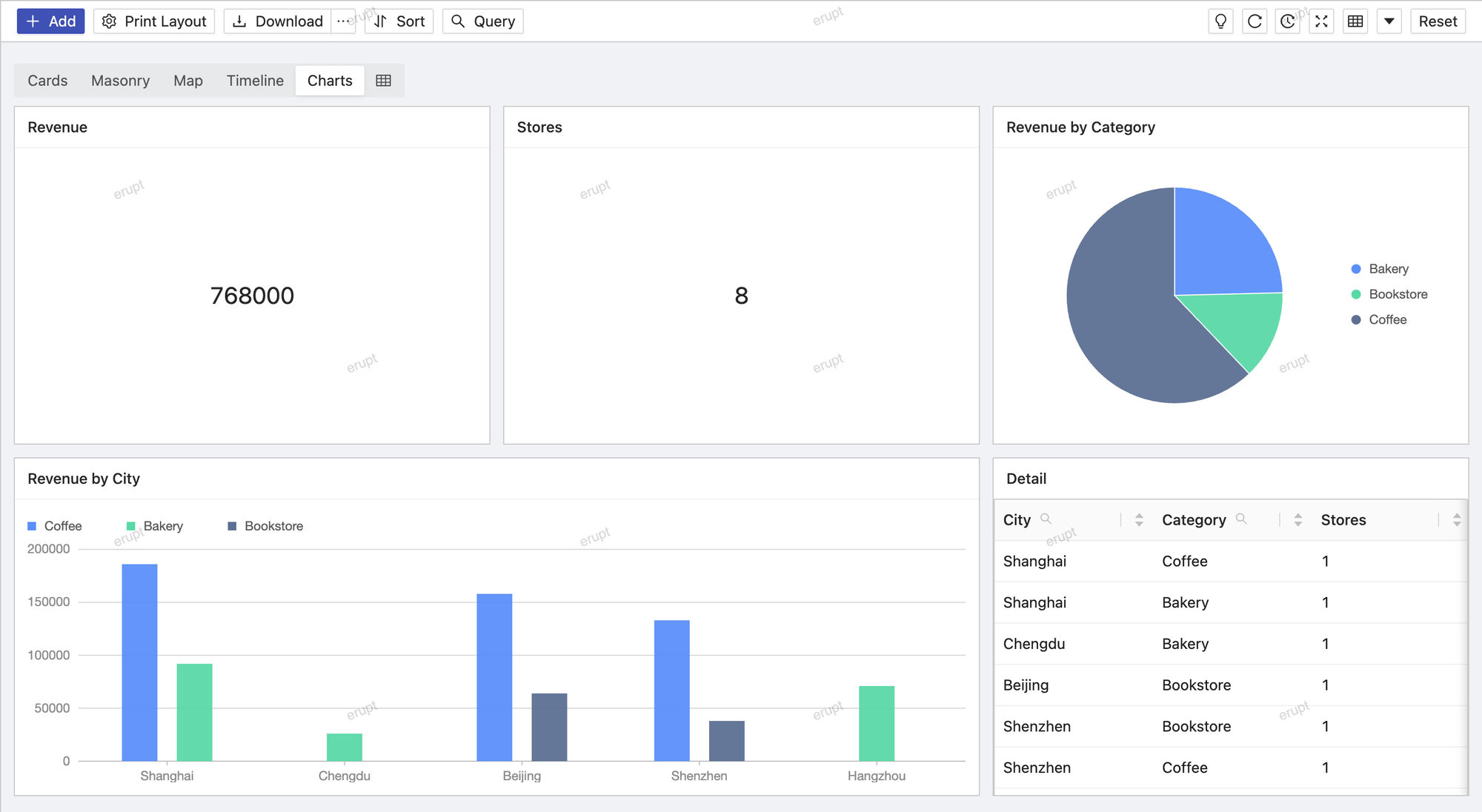
cube 语义模型
图表背后的 @EruptCube 语义模型与看板的区别见 Erupt Cube · 模型视图图表。
完整示例
最简单的做法是让模型自己同时也是一个 cube:cube 保持默认的 Void.class,即表示「被注解的模型本身」。
java
@Entity
@Table(name = "t_order")
@EruptCube(name = "订单分析", sql = "t_order", sqlType = SqlType.TABLE_NAME)
@Erupt(
    name = "订单",
    vis = {
        @Vis(
            code = "charts",
            title = "图表",
            type = Vis.Type.CUBE,
            cubeView = @CubeView(
                columns = 2,
                charts = {
                    @CubeChart(title = "销售额", type = CubeChart.Type.KPI, y = "amount"),
                    @CubeChart(title = "订单数", type = CubeChart.Type.KPI, y = "orders"),
                    @CubeChart(title = "各渠道销售额", type = CubeChart.Type.COLUMN, x = "channel", y = "amount"),
                    @CubeChart(title = "品类占比", type = CubeChart.Type.PIE, x = "category", y = "amount"),
                    @CubeChart(title = "销售趋势", type = CubeChart.Type.LINE,
                               x = "createTime", y = "amount", series = "channel", span = 2)
                }
            )
        )
    }
)
public class Order extends BaseModel {

    @Dimension(title = "渠道")
    @EruptField(
        views = @View(title = "渠道"),
        edit = @Edit(title = "渠道", search = @Search)
    )
    private String channel;

    @Dimension(title = "品类")
    @EruptField(
        views = @View(title = "品类"),
        edit = @Edit(title = "品类", search = @Search)
    )
    private String category;

    @Dimension(title = "下单时间")
    @EruptField(
        views = @View(title = "下单时间"),
        edit = @Edit(title = "下单时间", search = @Search(vague = true))
    )
    private Date createTime;

    @Measure(title = "销售额", sql = "sum(amount)")
    @EruptField(
        views = @View(title = "金额"),
        edit = @Edit(title = "金额")
    )
    private Double amount;

    @Measure(title = "订单数", sql = "count(1)")
    @Transient
    private Long orders;

}
也可以把图表挂到另一个单独的 cube 类上:
java
@Vis(
    title = "图表",
    type = Vis.Type.CUBE,
    cubeView = @CubeView(
        cube = OrderCube.class,
        searchMapping = @KV(key = "customer.name", value = "customerName"),
        charts = { ... }
    )
)
@CubeView 属性说明
java
public @interface CubeView {

    Class<?> cube() default Void.class;          // 要查询的 @EruptCube 类,Void 表示当前模型

    String explore() default Explore.OVERVIEW;   // cube 的 explore 编码

    boolean linkSearch() default true;           // 把列表的搜索条件转为 cube 过滤

    KV[] searchMapping() default {};             // 搜索字段 -> cube 字段的名称映射

    int columns() default 2;                     // 每行图表数

    int height() default 320;                    // 图表高度(px)

    CubeChart[] charts();                        // 图表列表(必填)

}| 属性名 | 描述 |
|---|---|
cube | 承载 @EruptCube 的类;默认 Void.class 表示被注解的模型本身,此时模型自己要标注 @EruptCube |
explore | 使用 cube 的哪个 explore,默认 overview |
linkSearch | 是否把列表的搜索条件作为 cube 过滤条件转发给每个图表,默认 true;被搜索的字段必须是 cube 的维度 |
searchMapping | 搜索字段名与 cube 字段名不一致时的映射,如 @KV(key = "customer.name", value = "customerName");未映射的字段按原名转发 |
columns | 网格每行放几个图表,默认 2 |
height | 每个图表的高度,默认 320 px |
charts | 图表定义列表(必填),见下方 @CubeChart |
@CubeChart 属性说明
java
public @interface CubeChart {

    String title() default "";

    Type type();                 // 图表类型(必填)

    String[] x() default {};     // 维度字段:x 轴 / 分类 / 透视表行

    String[] y() default {};     // 度量字段:y 轴 / 数值 / 透视表值

    String series() default "";  // 系列维度:图例 / 透视表列 / 热力图 y 轴

    int span() default 1;        // 跨越的网格列数

    KV[] ui() default {};        // 额外图表选项,如 KPI 的 color、fontSize

    enum Type {
        LINE, AREA, BAR, COLUMN, PIE, SCATTER, RADAR, FUNNEL, DUAL_AXES, GAUGE, WATERFALL,
        WORD_CLOUD, ROSE, RADIAL_BAR, SANKEY, CHORD, MAP, BUBBLE, TREEMAP, HEATMAP,
        TINY_LINE, TINY_AREA, TINY_COLUMN, PROGRESS, RING_PROGRESS, TABLE, PIVOT_TABLE, KPI
    }

}| 属性名 | 描述 |
|---|---|
title | 图表标题 |
type | 图表类型(必填),与 erupt-cube 看板中的报表类型一致 |
x | 维度字段:折线 / 柱状图的 x 轴、饼图的分类、透视表的行 |
y | 度量字段:y 轴、数值、透视表的值;KPI 只需要 y |
series | 分系列的维度:图例、透视表的列、热力图的 y 轴 |
span | 图表跨越的网格列数,默认 1;设为 columns 的值可独占一行 |
ui | 透传给图表的额外选项,如 @KV(key = "color", value = "#1890ff") |
字段名直接写 cube 的字段名;若 cube 通过 @Join 关联了其他 cube,用 OtherCube.field 的形式引用关联 cube 的字段。
说明
- 列表顶部的搜索条件变化时,图表随之重新查询;点击图表元素(如柱状图的某一柱)会加上对应的等值过滤,以可删除的标签显示在视图上方
- CUBE 视图会一次性加载查询结果并隐藏分页器
- 图表的渲染与查询由 erupt-cube 模块完成;未引入 erupt-cube 时,该视图显示「图表不可用」的空状态,不影响其他视图
WARNING
linkSearch = true 时被转发的搜索字段必须在 cube 中声明为维度(@Dimension),否则 cube 无法按该字段过滤。字段名不一致时用 searchMapping 映射。
贡献者
 YuePeng